Your Trusted Digital Marketing Agency

Author: Chris Wood

How AI is changing Meta advertising

How AI is changing Meta advertising

Have you ever visited a website, looked at a particular product or service and then started seeing Ads relating to it when you were back on Facebook or Instagram? You may not have searched for it on Facebook, followed the company or even shown any particular interest in that subject on social media, yet there it is in your feed. If you’ve noticed this happening more often, it’s not just your imagination. Meta is using AI much more to understand people’s behaviour and decide which Ads are most relevant to them, and this is changing how businesses need to think about advertising on Facebook and Instagram.

Meta is doing more of the targeting for you

If you’ve been running Facebook or Instagram Ads for a while, you’ll probably remember spending quite a lot of time choosing interests, demographics and different audience options. You might create one audience for people interested in a particular product, another for a different type of customer and another for people who had already visited your website. You can still use audience targeting, but Meta is increasingly using AI to target audiences. It can look at a range of signals, including people’s behaviour and interests, information in your Ad and what you want your campaign to achieve, to work out who is most likely to respond. This doesn’t mean you should just put an Ad online and leave Meta to do everything. You still need to know who your customers are, what you want to achieve and what you want to say to them. The difference is that you don’t necessarily need to spend as much time trying to work out exactly which interests and audience settings will find those people.

Good content has always mattered – now it matters even more

We all know the saying ‘content is king’ and, with Meta’s AI helping to find your ideal audience, it’s arguably even more important now. Rather than relying on detailed audience targeting of the past to tell Meta who you want to reach, your Ads themselves are giving Meta more information about your business, your products and the people who might be interested in them. This means the message, images and videos you use are really important. For example, if you run a hotel, you could have Ads focusing on weekend breaks, family holidays, spa facilities or your restaurant. Each Ad is giving Meta different information about what you offer and could appeal to different people, so you don’t necessarily need to create a completely separate audience for every Ad.

When creating Meta Ads, you must think about:

  • What your customers want – what are they looking for?
  • The benefits – why should they choose you?
  • Your creative – could different images, videos, testimonials or messages appeal to different people?
  • Your objective – what do you actually want someone to do after seeing your Ad?

This is where high quality marketing still matters. Meta may be able to help find the people most likely to respond, but it doesn’t know which of your products you most want to promote, what makes your business different, or which offers are particularly important to you. That still comes from having a good understanding of your customers and your business, and using that knowledge to create the right campaigns, messages and Ads. You then need to look at the results and use what you learn to decide what to test, change or improve.

What happens when someone visits your website?

If you have the Meta Pixel set up on your website, information about relevant visitor activity can be shared with Meta, subject to the appropriate privacy and consent requirements. This can then be used as one of the signals that helps Meta understand what someone might be interested in. This is one reason you can visit a website, look at a particular product or service and then come across Ads for similar products or services when you’re back on Facebook or Instagram. Website activity can form part of the information Meta uses when deciding which Ads may be relevant to someone.

This also means that remarketing doesn’t necessarily have to work in quite the same way as it used to. You may have previously created a specific campaign aimed at everyone who had visited your website, but Meta is now better able to use different signals to decide who is likely to respond to an Ad. That doesn’t mean remarketing is no longer useful. If you have a particular offer, product or message that you specifically want to put in front of previous website visitors, a dedicated campaign can still be a good approach. It’s just another area where you don’t necessarily need to rely on detailed audience selection in the way you might have done previously.

Your other marketing can help your Meta Ads too

This is also where things get interesting, if you are using several different marketing channels. Someone might find your business through Google, click on one of your Google Ads, read one of your blog posts, visit a product page or come across your business at an event before they ever see one of your Ads on Facebook or Instagram. If they visit your website and the relevant tracking is in place, that website activity can potentially become one of the signals Meta uses when deciding which Ads may be relevant to them.

For example, someone might search Google for a product, click on your Ad and visit your website but not be ready to buy. A few days later, they are scrolling through Instagram and see one of your Ads. You can’t assume that everyone who visits your website will then be shown your Meta Ads, but it highlights how the different parts of your marketing can work together. Your Google Ads, SEO, content and Meta Ads don’t always need to be treated as completely separate activities, particularly when someone moves between different channels before deciding to buy.

So, what does this mean for small businesses?

The good news is that you don’t need to understand exactly how all of Meta’s AI technology works to make the most of it. There are, however, a few things that are worth getting right:

  1. Make sure your tracking is set up correctly so Meta has useful information to work with
  2. Think carefully about what you want your Ads to achieve rather than simply putting an Ad in front of as many people as possible
  3. Create Ads with clear messages, relevant products and strong creative
  4. Give Meta different things to work with by testing different products, benefits, images, videos and messages
  5. Look at your results and use them to decide what you should do next

The days of spending hours trying to build the perfect Facebook audience aren’t necessarily gone, but Meta is taking on more of that work. That means your time can be better spent understanding your customers, getting your messaging right, creating strong content and looking at what is actually working. Meta’s AI can help you find the people most likely to be interested, but you still need to give it the right things to show them and make sure your Meta Ads are part of a wider marketing strategy.

Need help with your Meta Ads?

Meta advertising is changing, but getting the best from it still means having the right strategy, creative, tracking and ongoing management in place. If you’re considering Meta Ads for your business, or already have campaigns running but aren’t sure you’re getting the most from them, QSM Digital can help. We manage Meta advertising across Facebook and Instagram, from campaign setup and strategy through to ongoing optimisation and reporting. Get in touch to find out how we could help you make more of your Meta advertising.


Maximise online sales for christmas festive season

Top 6 Tips To Increase Christmas Sales For Retailers

If you’re a retailer, now is the time you should be pulling out all the stops to maximise Christmas sales. Here’s our top six tips.

1. Set up and Optimise Google Shopping

If you have products to sell you need to set up Google Shopping Ads. They’re ideal for showcasing your products and making it easy for people to buy. Make sure you have optimised your settings – for more on Google Shopping read our blog here.

2. Stay Top of People’s Minds with Remarketing

People do a lot of browsing leading up to Christmas, looking for the ideal gifts. If you want to make sure people are reminded of your products, remarketing is a powerful tool. Remarketing works by retargeting your website customers with adverts about your business as they browse the web. Don’t let them forget your website. You can set up remarketing Ads in Google, Facebook and Instagram.

3. Facebook Catalog Ads

For online retailers, Facebook Catalog Ads can be a game changer. Here are some tips to maximise their effectiveness:

Facebook provides robust options for targeting based on demographics, interests, and behaviors. Customise your catalog ads to reach individuals who are most likely to be interested in your products. Use high-quality images and videos, as compelling visuals are key to capturing attention and driving clicks. Experiment with various ad formats, such as carousels, single images and videos, to determine which resonates most with your audience. Lastly, leverage the power of retargeting by reminding visitors of the products they viewed but didn’t purchase. This ‘recently viewed’ reminder can effectively rekindle interest and boost conversions.

If you want more tips on how to increase sales with Facebook Ad campaigns, please read our blog here.

4. Increase your Budget

This might sound obvious, but if you’re already running Google Ad and social media campaigns it is worth upping your spend in the run up to the Christmas period to increase your sales. If your Ads are effective, the more you spend, the more sales you should have. Don’t forget to make sure you have enough stock to deal with an increase in sales.

5.  Email Marketing

Do you have an email marketing list? If so make sure you use your enewsletter to push your popular products, explaining their key features and benefits. Make sure you send an e-shot in early December regarding last postage days, so your customers don’t miss out.

6. Review your Settings

Finally, make sure your budget isn’t being wasted by reviewing the setup of your Ad campaigns. Review your location settings, bids and search queries. By blocking irrelevant keywords used when people search for your products, you can really help to minimise wasted clicks and get the maximum return on your budget.

We hope you found these tips helpful and we wish you a busy trading period in the run up to Christmas. For help with managing and boosting your online advertising campaigns, get in touch.

Google Performance Max Campaigns

Why Google Performance Max Campaigns Are Essential For Ecommerce

Running an ecommerce business? Using Google Performance Max campaigns? If not, then you should be.

Performance Max is one of Google’s most powerful campaign types for ecommerce businesses. It gives retailers access to all of Google’s advertising inventory through a single, goal-based campaign. As Google’s AI and machine learning capabilities continue to evolve, Performance Max has become an increasingly effective way to help businesses reach customers across multiple channels.

Google describes Performance Max as a way to “show up across all of Google’s Ad inventory and formats, helping you find new customers wherever, and whenever they’re searching or consuming content.” Based on the information you provide during setup, Google’s AI uses machine learning to help deliver your ads to the audiences most likely to convert.

Let’s dive a little deeper into Performance Max campaigns

Performance Max campaigns are Google’s most automated campaign type and are ideal for ecommerce businesses looking to drive sales. They work particularly well when focusing on a specific range of products or promoting a seasonal offer, rather than building general brand awareness. Other campaign types are often better suited for awareness objectives.

As mentioned above, Performance Max campaigns can appear across Google’s entire advertising network, in particular for the Shopping results will people are actively searching to buy, including:

  • Google Search
  • Google Shopping
  • Display Network
  • YouTube
  • Gmail
  • Google Maps
  • Discover and other Google properties

Rather than creating separate campaigns for each platform, Performance Max automatically determines where your ads are most likely to perform best.

For example, if you sell garden furniture, you could create a campaign specifically promoting your range of garden sofas. During setup you’ll create your asset groups, which include:

  • Final URL
  • Product images and videos
  • Business logo
  • Headlines
  • Descriptions
  • Call to action, such as ‘Shop Now’

You’ll also create one of the most important parts of your campaign, your audience signals.

What are audience signals?

Audience signals help Google understand the type of customers you want to reach. While Google now uses AI to find additional customers beyond your initial audience, providing strong audience signals gives the system a valuable starting point.

You can build audience signals using information such as:

  • Age range
  • Previous website visitors and past purchasers (using audiences created in GA4)
  • Customer lists, where available
  • People with interests related to your products or services
  • Search themes related to your products and services
  • Interests, such as gardens and outdoor living
  • Life events, such as moving home, getting married or celebrating an anniversary

Google’s AI then uses these audience signals alongside real time customer behaviour to find people most likely to convert. As the campaign gathers more data, it continually learns which audiences, placements and creative assets are generating the best results, automatically adjusting delivery to maximise performance.

There are many ways to reach your target audience with Google Ads Audience Signals

Feed optimisation is more important than ever

One area that has become increasingly important is your product feed.

Performance Max relies heavily on the quality of the data in your Google Merchant Center feed. Accurate product titles, detailed descriptions, high-quality images and complete product information all help Google’s AI better understand your products and match them with relevant searches.

A well optimised feed can have a significant impact on campaign performance, often making the difference between average and exceptional results.

Performance Max isn’t completely ‘set and forget’

Although Performance Max automates much of the campaign management, it’s not a campaign you should simply leave running.

The best performing campaigns are regularly reviewed and optimised by:

  • Refreshing creative assets
  • Improving product feed data
  • Monitoring conversion tracking
  • Reviewing search term insights
  • Testing new audience signals
  • Using brand exclusions where appropriate to maintain greater control over where your Ads appear

Google has also introduced more reporting and campaign insights than were available when Performance Max first launched, giving advertisers greater visibility into what’s working and where further improvements can be made.

Ready to get more from your Google Ads?

Performance Max can be an incredibly effective way to grow your ecommerce business, but like any Google Ads campaign, success depends on having the right strategy, accurate tracking and ongoing optimisation.

At Q Social Media, we help ecommerce businesses of all sizes get the best possible return on their Google Ads investment. From campaign setup and product feed optimisation to ongoing management and reporting, we’ll ensure your campaigns are working as hard as they can.

If you’d like to find out how Google Performance Max could help your business, we’d love to hear from you. Get in touch with our friendly team today to discuss how we can help you generate more traffic, more sales and a better return on ad spend (ROAS).

Frequently asked questions

Is Google Performance Max right for my ecommerce business?

Performance Max is an excellent option for many ecommerce businesses, particularly those with an established product catalogue and online sales. It can help you reach customers across Google’s entire network while using AI to optimise your campaigns for conversions.

Do I still need to manage my Performance Max campaigns?

Yes. Although Performance Max automates much of the bidding and Ad delivery, regular optimisation is still essential. Reviewing performance, updating creative assets, refining audience signals and maintaining an optimised product feed can all make a significant difference to your results.

Can Performance Max work alongside other Google Ads campaigns?

Absolutely. Performance Max is designed to complement other campaign types. 

Why choose Q Social Media to manage your Google Ads?

Our experienced team works with businesses across a wide range of industries to create and manage Google Ads campaigns that deliver measurable results. We take the time to understand your business, optimise your campaigns on an ongoing basis and provide clear, transparent reporting, helping you get the best possible return on your advertising budget.

If you’re looking for expert support with your Google Ads strategy, please contact us, we’d be delighted to help.

Facebook Catalogue Ads

The benefits of Meta Catalogue Ads for ecommerce businesses and how to use them

Do you have an ecommerce website? Then it’s highly likely that you will benefit from running Meta Advantage+ Catalogue Ads (previously Facebook Catalogue Ads). These Ads show your products to your chosen audience across Facebook, Instagram, Messenger and other placements within the Meta network. The great thing about Catalogue Ads is they are personalised to your audience as they target people who have already interacted with your business, giving you the likelihood of a better return on Ad spend.

You could also choose to show your products to a broader audience who will be targeted based on their behaviours and interests, including people who have shown an interest in products similar to yours. A huge benefit is that Meta does the legwork by using its machine learning and Advantage+ technology to decide which products from your catalogue to show to each individual user.

Another good reason to use them is that while they are a bit more time-consuming to set up compared to a standard Meta Ad, the process is relatively straightforward, and they require low ongoing maintenance as you won’t have to manually update products within your Ads. As long as your product feed is syncing correctly, your Ads can automatically reflect changes such as stock levels, pricing and new products.

Why you need to set up the Meta Pixel and Conversions API

Before you make a start with Meta Catalogue Ads you will need to set up the Meta Pixel. The Meta Pixel is a piece of code that you or your web developer can place on your website. It collects information about the actions that people take on your website, such as viewing products, adding items to their basket and making purchases

Meta then uses this data to help you target people who have visited your website with personalised advertising

We would also strongly recommend implementing the Conversions API (CAPI) alongside your Meta Pixel. This helps improve tracking accuracy by sending conversion data directly from your website server to Meta, making reporting and optimisation more reliable in a privacy-first environment

How to set up Facebook Catalogue Ads

  1. Log in to Meta Commerce Manager and create a catalogue.
  2. Create a product feed. This gives Meta all the information about your products. You can add the information manually, but ecommerce platforms such as Shopify, WooCommerce and BigCommerce offer integrations and plugins that make this process much easier.
  3. Add items to your catalogue and check that product information, pricing, availability and images are pulling through correctly.
  4. Connect your catalogue to your Meta Pixel and Conversions API so that Meta can match user behaviour with products from your catalogue.
  5. Once everything is set up, you can create a Catalogue Sales campaign in Meta Ads Manager and begin promoting your products.
Advertise to an audience that is likely to buy from you.

Top tips for getting the most out of your Meta Catalogue Ads

• You can write your own Ad copy, or use dynamic fields from your product feed so that the Ad matches the product being shown as closely as possible. The more relevant your Ad is to the product being displayed, the more likely you are to attract people who are genuinely interested in buying

• Create an Ad Set for people who viewed products or added items to their basket but did not complete a purchase. This remains one of the most effective ways to recover potentially lost sales

• Don’t rely solely on retargeting. Meta’s Advantage+ Catalogue Ads can also be highly effective for prospecting and reaching new customers who are likely to be interested in your products

• Ensure your product feed is well maintained. High-quality product images, accurate descriptions and up-to-date pricing can significantly improve performance

• Test different placements including Facebook Feed, Instagram Feed, Instagram Stories and Instagram Reels. Different placements can perform very differently depending on your audience and products

• Play around with how your adverts look to show off your products. You can use carousel formats, collection Ads and dynamic creative options to showcase products in different ways. As with any social media advertising, high-quality imagery is essential if you want to stand out in a crowded feed

• Consider using promotional overlays, seasonal messaging and product labels where appropriate. These can help draw attention to offers and improve click-through rates.

We hope this blog has helped you to learn more about Meta Catalogue Ads and whether they are right for your ecommerce business. If you think you could benefit from running these Ads and would like help setting them up and managing them, please contact us at Q Social Media and our friendly team will be happy to help.

QSM Digital - Pay per click

Why Use QSM Digital for PPC Management?

When it comes to running successful Pay Per Click (PPC) campaigns, choosing the right agency can make a huge difference. At QSM Digital, we pride ourselves on being proactive, transparent and genuinely collaborative with our clients.

Over the years, we have worked with businesses at various stages of their PPC journey. Many clients come to us looking for a more collaborative and proactive approach than they have previously experienced, with clearer communication, transparent reporting and ongoing support to help maximise their campaign performance.

A collaborative approach that works both ways

We believe the best PPC campaigns are built through two-way collaboration. While we bring the Google Ads expertise, our clients know their products, services and customers better than anyone.

By working closely together, we can identify opportunities, refine messaging and continually improve campaign performance. Whether it’s discussing seasonal trends, new products, promotions or customer feedback, ongoing communication helps campaigns stay aligned with business goals.

This partnership approach is something many of our clients value highly. Rather than a ‘set it and forget it’ service, we actively work with businesses to improve performance over time.

Clear monthly reporting without the jargon

One of the biggest frustrations we hear from new clients is that previous agencies failed to provide clear reporting or explain results properly.

At QSM Digital, we provide monthly reports that clearly show campaign performance, including:

  • Clicks and website traffic
  • Conversions and sales
  • Cost per conversion
  • Return on Ad spend
  • Keyword and audience insights
  • Areas of growth and improvement

Importantly, we explain results in straightforward language wherever possible, without unnecessary technical jargon. We understand not every business owner lives and breathes Google Ads daily and you should not need a PPC qualification to understand how your marketing budget is performing.

For many clients, this transparency gives reassurance and confidence that campaigns are being actively managed and optimised.

Proactive campaign management

Successful PPC management is not simply about launching Ads and hoping for the best. Campaigns need ongoing monitoring, refinement and optimisation.

At QSM Digital, we continually review campaign performance and provide feedback to our clients on:

  1. What is performing well
  2. Where improvements can be made
  3. Opportunities to increase conversions
  4. Ways to reduce wasted spend
  5. Seasonal or market trends that could impact results

This proactive management helps ensure campaigns continue moving in the right direction rather than stagnating over time.

As Google Ads becomes increasingly automated, expert oversight actually remains essential. Google’s own Performance Max campaigns can be highly effective, but they still require strategic input and active optimisation to maximise returns.

Why specialist PPC management matters

Many businesses are tempted by agencies offering to handle everything under one roof including websites, SEO, social media and PPC. While this can sound appealing initially, it does not always deliver the best results.

One of our clients recently shared their experience after trying this approach:

“We started work with a company that offered to look after our Website, SEO, Socials & PPC all under one hat. Which when proposed looked like a ‘makes sense’ proposition. However, it’s safe to say they’re currently less than inspirational, not delivering on promises and certainly not as proactive as yourselves with our PPC.”

In this particular case, the client quickly returned to working with us again, after seeing the difference in proactive PPC management and communication. This is something we hear regularly. PPC advertising requires specialist expertise, constant attention and a genuine understanding of how to maximise returns from advertising budgets.

Experience across multiple industries

We manage PPC campaigns across a wide range of sectors including:

  • Ecommerce
  • Retail
  • Tourism
  • Wedding venues
  • Events
  • Charities
  • Professional services

Because we work across different industries, we are able to identify trends, opportunities and strategies that can often be adapted successfully between sectors.

Our experience managing ecommerce Google Shopping campaigns has also helped many businesses significantly improve conversion rates and Return on Ad Spend, through active optimisation and audience refinement.

We focus on continuous improvement

PPC is constantly evolving. Google Ads introduces new features and automation tools regularly, which means campaigns need to adapt to stay competitive.

That is why we regularly share advice and optimisation tips through our blogs, including:

These blogs provide our audience with useful insights into how ongoing optimisation can improve PPC performance and maximise advertising budgets.

Trusted by businesses across the UK

We are proud to have built long term relationships with many of our clients through honest advice, proactive management and transparent reporting. Our focus has always been on helping businesses grow through effective digital marketing and reporting.

You can also read our latest 5 Star Google Reviews (formerly Q Social Media) to see what our clients say about working with us. One recent client review described us as being “professional, knowledgeable and always quick to respond”, while another praised our team for their “clear communication and proactive approach throughout our campaigns”. Clients regularly highlight our responsiveness, transparent reporting and the way we explain PPC performance in a straightforward and easy to understand manner.

Looking for help with PPC management?

Whether you are running Search Ads, Shopping, Remarketing or Performance Max campaigns, having an experienced and proactive PPC partner can make a significant difference to results.

We focus on making PPC management straightforward, transparent and effective so you can focus on running your business, while we focus on improving your campaigns. If you would like to discuss us taking over your campaign management then please get in touch with our friendly and knowledgeable team.

How to improve performance of Google Search Ads

3 Top Tips For Improving Performance of Google Search Ads

Google Search Ads are one of the most effective ways to capture high intent traffic, targeting users who are actively searching for your products or services. While they can be quick to launch, achieving strong and consistent performance comes from how well campaigns are set up and then optimised over time.

Below are three key areas we focus on or our own clients to help improve performance and drive better returns from Google Search campaigns.

1. Ad setup

The Ad setup is the key foundation of any Search campaign and something that is often underutilised. With Responsive Search Ads, Google allows up to 15 headlines and 4 descriptions, which are then rotated and combined in different ways to find the best performing combinations. This is a big factor in improving click through rate, known as CTR, which is Ad clicks to views.

We recommend making full use of this functionality. The more variation you give Google, the more it can test and learn what messaging works best for your audience.

A key part of our approach is ensuring relevance from the start. We do this by pinning the main keyword focused headlines into headline 1 positions. This helps make sure the Ad closely matches what the user has searched for, which is a major factor in improving CTR. From there, we allow Google to rotate the remaining headlines into positions 2 and 3 so it can continue testing different combinations and improving performance over time.

For descriptions, there is more flexibility depending on how much control is needed. Google prefers to rotate all descriptions automatically, which can help with optimisation. However, if there is a specific message or structure that needs to be maintained, descriptions can be pinned into line 1 and 2 positions. Only two descriptions show at any one time, so this approach can be useful when tighter control is required.

We recommend:

  • Using 10 – 15 headlines and 4 descriptions to maximise variation
  • Pinning important keyword headlines into headline 1 for consistency and relevance

2. Keyword research and targeting

Keyword targeting is another area that can have a big impact on performance. It is less about covering every possible search term and more about focusing on the most relevant and high intent queries.

Using Google’s Keyword Planner, you can identify the core terms your audience is searching for. From there, we recommend building a focused list rather than a large one. Google will already match closely related variations, so adding too many keywords can often create overlap rather than improve coverage.

Google’s Keyword Planner

Match type selection is important here. Phrase and Exact match tend to provide the best balance between reach and control, allowing you to target relevant searches without opening the campaign up too broadly. Broad match can sometimes lead to Google interpreting queries too loosely, which could result in Ads showing for searches that are not closely aligned to what you are offering.

We also tend to be cautious with automated expansion features such as AI Max. While these can work well for larger advertisers with bigger budgets, they can use spend quickly for smaller campaigns, while Google tests a wide range of queries. Where they can be more effective is within brand campaigns, where tighter controls can be applied to limit how broad targeting becomes.

Its best to:

  • Focus on a smaller set of high intent keywords rather than volume
  • Use Phrase and Exact match to keep targeting relevant and controlled

3. Review search queries and build negative keywords

Ongoing optimisation is where a lot of performance gains are made, and reviewing search queries is one of the most important parts of this process. It is also one of the areas that is often overlooked or not done frequently enough.

By analysing the actual search terms that trigger your Ads, you can quickly identify which queries are relevant and which are not. Any that are not relevant can be added as negative keywords, preventing your Ads from showing for those searches again.

This has a direct impact on CTR. By filtering out irrelevant traffic, your Ads are shown more often to users who are likely to be interested, increasing the likelihood of clicks.

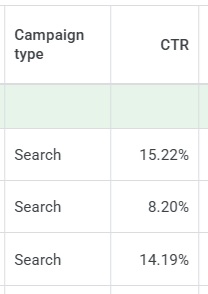
As a guide, the minimum recommended CTR is around 5%, with UK averages typically sitting around 4–5%. Across our campaigns, we are often seeing results at 6 percent or higher, with some reaching between 10% and 20%. As CTR improves, this typically helps reduce the average cost per click over time, allowing more clicks for the same budget.

Q Social Media CTRs

This is something we consistently work on for our clients, regularly reviewing search queries and expanding negative keyword lists to keep improving performance. Having dedicated resource focused on this area can make a significant difference, particularly over longer periods.

Remember to:

  • Regularly review your search queries to maintain relevance
  • Build and refine your negative keyword lists to improve CTR over time

Google Search Ads performance is driven by a combination of strong setup and consistent optimisation. By structuring Ads effectively, focusing on the right keywords and regularly refining search queries, campaigns are set up to improve over time and become more efficient.

If you are running Search campaigns and not seeing the results you would expect, or want to improve performance further, this is usually where the biggest opportunities can be found.

If you would like support reviewing your current campaigns or exploring how to improve performance, feel free to get in touch with us at Q Social Media.

Generative Engine Optimisation – How to Get Your Business Found in AI Search

Generative Engine Optimisation – How to Get Your Business Found in AI Search

Search behaviour is changing quickly. People are no longer only clicking through traditional listings on Google. They are increasingly using AI powered search experiences and tools such as ChatGPT to ask questions, receive summaries and find recommended businesses. If your business does not appear in these responses, you could be missing valuable enquiries. Generative Engine Optimisation, or GEO, focuses on ensuring AI tools can find, understand and reference your business when potential customers search.

What is Generative Engine Optimisation

Generative Engine Optimisation is the process of improving your website and online presence so AI driven search tools can interpret and recommend your business accurately. Traditional SEO focuses on ranking in standard search listings. GEO focuses on being included in AI summaries and conversational answers. The two approaches work together, and strong SEO foundations support stronger AI visibility.

AI systems scan content, interpret meaning and generate responses. If your website lacks clarity, structure or sufficient detail, it may not be referenced even if you appear in traditional listings. GEO ensures your content is structured in a way that AI tools can confidently understand and use.

Why GEO matters for your business

AI generated results often appear at the top of the page. In many cases, users receive their answer without clicking through to websites at all. This means competitors may be recommended instead of you, potential customers might not scroll down to traditional listings, and enquiries can reduce without an obvious reason. For small business owners this directly affects visibility, engagement and sales.

Check how your business appears in AI search

A simple first step is to test your visibility for yourself. Use Google’s AI mode within the search engine and search for your main service along with your location. Review whether your business is mentioned in the AI summary.

Next, try similar searches in ChatGPT. Results can differ between platforms because each gathers and interprets information differently.

If your business does not appear in ChatGPT, you can ask it why not directly. For example, ask why your company is not being recommended for a specific service. It often provides helpful feedback such as limited reviews, unclear service pages, not enough mentions on other reputable websites or insufficient authority signals for example. This insight can help you understand what needs improving and guide your next steps.

Using Authority signals to get noticed

Authority signals are pieces of online evidence that show your business is trusted, credible and knowledgeable. Search engines and AI tools use these signals when deciding which businesses to recommend.

Common authority signals include:

• Positive Google reviews
• Mentions on reputable websites
• Backlinks from trusted organisations
• Detailed service pages that clearly explain what you do
• An up to date about page that outlines your experience

When these signals are consistent and strong, AI tools are more confident in referencing your business in their responses.

Want to know how to optimise your website for AI? Below is a practical checklist to help strengthen your website for AI search:

  1. Use simple, clear language

Write in plain English, that customers can easily understand. Avoid jargon and complex explanations. Clear wording benefits for both your readers and AI systems.

2. Begin with direct answers

Start pages and blog posts with a straightforward explanation of the main topic. Then provide additional detail beneath. AI tools often extract summaries from the opening sections of content, so clarity at the start is very important.

3. Structure your content clearly

Use headings and subheadings to organise information logically. Break longer sections into readable paragraphs. Clear structure helps both users and AI systems interpret your content.

4. Add FAQ sections

Include frequently asked questions that reflect real customer enquiries. AI tools are designed around question and answer formats, so clearly written FAQs increase the likelihood of your content being referenced.

5. Review and update key pages

Audit your home page and core service or product pages to ensure they clearly describe what you do, who you help and where you operate. Make sure your about page is current and clearly explains your background and experience. This builds credibility and strengthens authority.

Review your SEO meta titles and descriptions so that each page accurately reflects its content and includes relevant keywords. Speak with your website developer to ensure appropriate schema markup is enabled, such as Local Business and FAQ schema. Schema markup is a special code added to a website’s backend that acts as a ‘label’ to help search engines understand content better.

Finally, continue driving traffic to your home page, key service pages and blog content. Increased visibility and engagement, whether through organic activity or paid channels such as Google Ads and Meta Ads, contributes to stronger authority over time.

GEO and SEO work together

Generative Engine Optimisation builds on traditional SEO, rather than replacing it. The fundamentals remain the same – clear content, relevant keywords, structured pages and strong trust signals. The key difference is that we now need to consider how AI tools such as ChatGPT and Google’s AI mode interpret and summarise that information.

By regularly reviewing how your business appears in AI search results and making improvements where needed, you can stay competitive as search continues to evolve. At Q Social Media, we help businesses to remain visible, credible and ready for the future of search.

If you would like expert help with your digital marketing please get in touch with us at Q Social Media.

Top Tips For Improving Returns On Google PMax Shopping Campaigns

Google Shopping – 3 Top Tips For Improving Returns On Google PMax Shopping Campaigns

If you’re running eCommerce campaigns through Google Performance Max (PMAX) and using Shopping feeds, you’ll know that while automation is powerful, it still needs direction. At Q Social Media, we regularly manage and optimise PMAX Shopping campaigns for businesses, and the difference between ‘letting it run’ and actively refining it can be significant. We’ve put together our three top optimisation tips to help increase conversions, improve return on Ad spend (ROAS), and reduce wasted spend.

1. Optimise your audience signals

PMAX is Google’s first fully automated campaign type, designed to help you access all of Google’s ad inventory, including Search, Display, YouTube, Gmail and Maps within a single campaign. To make this work, you provide ‘asset groups’ (such as product images, videos, and headlines), but the most critical component is the Audience Signal. While automation is doing the heavy lifting, it relies on these signals to guide its learning phase and find the right users at the right time.

Defining a specific audience is a relatively new shift for Google. Previously, the focus was almost entirely on search terms or targeting based on the types of websites a user visited. Now, Audience Signals tell Google exactly which groups you want to prioritise. You can target people using criteria such as:

  • Demographics & interests – Targeting specific age ranges or long-term hobbies, such as gardening or outdoor furniture
  • Intent & search history – Reaching people based on the specific keywords they use or the types of searches they have already performed
  • Competitor insights – Finding users who have visited similar product pages on competitor websites
  • Life Events – Catching customers during major milestones like an upcoming wedding, anniversary, or birthday

To optimise properly, you should ensure you are using your own first-party data wherever possible. Two of the most powerful tools for this are:

  • Customer Match Lists – You securely upload your own database of customer email addresses to Google. This allows the AI to find your existing customers across Google’s network and, more importantly, identify similar segments of new users who share their buying habits
  • Website converters – These are high-value audiences of people who have already completed an action on your site, such as making a purchase or filling out a form. By tracking these via GA4 and layering them into your signals, you tell Google exactly what a ‘successful’ customer looks like

The stronger and more aligned your signals are to your actual customer base, the faster Google’s machine learning can identify similar users likely to convert. You can further refine these signals by layering in demographics, interests, or even major life events to help AI hunt for new users with the same high intent.

2. Review search queries & build a negative keyword list

For a long time, advertisers couldn’t see the search queries driving clicks from PMAX campaigns, but over the last year, Google enabled visibility of this data, and it has been a game changer. Reviewing search queries allows you to identify irrelevant searches, improve your click-through rates (CTR), and lower your cost per click (CPC).

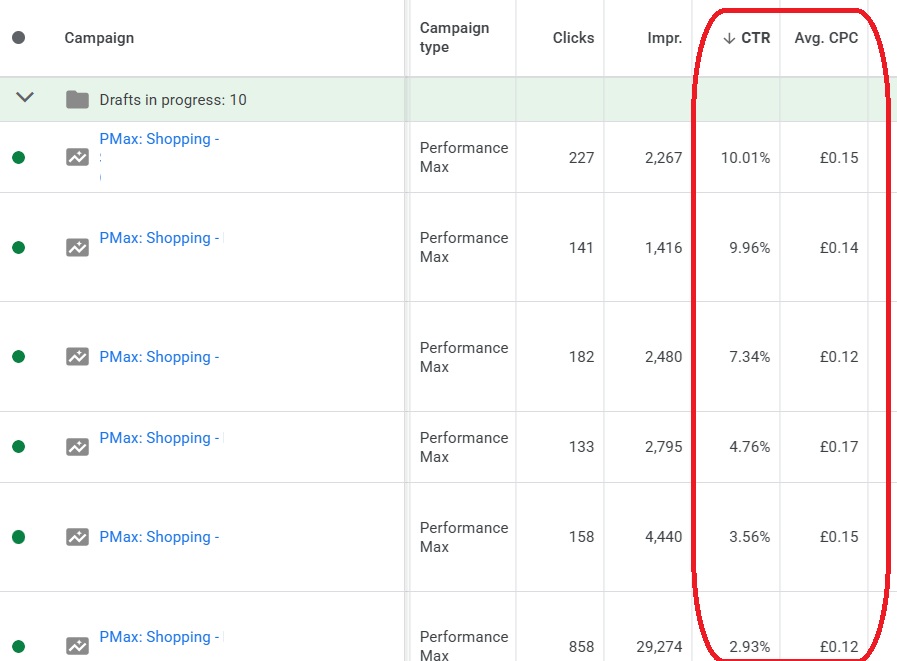
At Q Social Meida we regularly review search query data against conversion performance to add negative keywords, removing traffic unlikely to convert. This is essential for beating industry averages. Across the UK, the average Shopping CTR typically ranges between 0.86% and 1.9%.

Through consistent optimisation, we are achieving 3%+ CTR for many of our clients. While the UK average CPC is often between £0.50 and £2.00, we are frequently achieving £0.10 – £0.30 per click. Lower CPCs mean more clicks for the same budget and more opportunities to generate sales.

3. Review product data against conversions

While Google automatically optimises products against queries, it doesn’t mean every product deserves an equal budget. Some products convert well, while others drain the budget without producing sales. Regularly reviewing product-level performance allows you to identify high-return products that deserve more spend and block non-converting products entirely.

For some clients, we run multiple Shopping campaigns segmented by product type or profitability. By adjusting budgets regularly depending on conversion rates, we ensure the money flows toward the items actually generating revenue.

Expert management with Q Social Media

Google PMAX Shopping campaigns are not a ‘set up and forget’ solution. While the UK average conversion rate typically sits between 3.4% and 4.1%, many of our long-term clients see rates towards 9% through active management and consistent audience refinement.

Here we further improved the conversion rate for 1 client over the last year, from 6% to almost 9% and are in the process of doubling conversions as well.

If you’d like help reviewing the performance of your PMAX campaigns, we can audit your Google Ads account or manage and optimise your campaigns with ongoing reporting. Performance Max is powerful, but it performs best when guided by experts. Please get in touch with us to discuss your Google Ads management.

Google Ads AuditOutsource Ads Management

How to get products featured in ChatGPT search results

How to get products featured in ChatGPT search results

As search behaviour continues to evolve, retailers are starting to ask an important question: how do we make sure our products appear not just in Google, but in AI-powered tools like ChatGPT too?

While ChatGPT is not a traditional search engine, it increasingly surfaces product recommendations and brand information based on trusted, well-structured online content. For UK retailers, the foundations of appearing in ChatGPT search results are closely linked to strong SEO, high-quality content and consistent digital marketing activity.

Here’s how you can position your products to be picked up and referenced by ChatGPT, both now and in the future.

Focus on strong Google rankings (page 1 matters)

Products that rank highly on Google, particularly those appearing on page 1 are far more likely to be referenced by AI tools like ChatGPT.

Using Google Ads and Meta Ads to promote your products can play a key role here. While Ads don’t directly impact organic rankings, they do drive increased traffic to your website. Over time, this growth in organic and direct visits helps signal relevance and authority, which supports improved SEO performance.

In short, more visibility equals more engagement and better rankings, all of which increase the chances of your products being surfaced in AI-driven search results.

Optimise your product content with keywords

High-quality product content is essential. Your product titles should include the main keywords customers are actively searching for, while product descriptions should naturally incorporate secondary and related keywords. Avoid keyword stuffing, but ensure the language reflects how real customers describe and search for your products.

Well-written, informative product pages don’t just help Google understand your offering; they also provide the clear context AI models rely on when referencing products.

Don’t Overlook SEO Meta Data

SEO meta data still plays a crucial role. Ensure that meta titles and meta descriptions are optimised around your key product and category keywords. This helps search engines accurately index your pages and improves click-through rates from search results. Clear, relevant meta data makes it easier for both traditional search engines and AI tools to identify what your pages are about.

Implement product schema data

Product schema data is a big one. Schema uses structured fields that Google and other search engines rely on to understand product information such as:

  • Price
  • Availability (in stock / out of stock)
  • Product type
  • Reviews and ratings

ChatGPT can also read this structured data, making it easier for AI systems to identify and trust your product information. If you’re unsure where to start, your website developer can help implement and test schema correctly.

Actively build product reviews

Product reviews are a strong trust signal. Make it a priority to consistently gain reviews on an ongoing basis. Fresh, regular reviews help demonstrate credibility, popularity and customer satisfaction. These are all factors that influence visibility across search platforms.

Encourage reviews through post-purchase emails, loyalty incentives or follow-up messaging, and always respond where possible.

Use social media to reinforce product messaging

Your social media activity matters more than you might think.

Regularly post about:

  • Individual products
  • Key features and benefits
  • How products are used
  • Common customer questions

This consistent flow of product-related content helps reinforce your authority and gives AI tools more context about your brand and offerings.

Turn customer questions into content

If customers are regularly asking you the same questions, turn those queries into:

  • Website FAQs
  • Dedicated product pages
  • Blog posts that go into more detail

This approach not only improves the customer experience, but also creates highly relevant, search-friendly content that AI tools can reference.

Blogs are particularly useful for answering more detailed questions and positioning your brand as an expert.

Invest in informative website content

Beyond product pages, informative content such as blogs and FAQs plays a key role in AI visibility.

This type of content helps demonstrate expertise, authority and relevance, all of which are essential for being picked up by ChatGPT and similar tools.

The more helpful and informative your website is, the more likely it is to be referenced.

What’s coming next: ChatGPT product feeds

In the US, ChatGPT is gradually rolling out product feed integrations, allowing products to be pulled in more directly. While there’s currently no timeline for a UK rollout, it’s likely this functionality will arrive at some stage.

Retailers who already have strong product feeds, structured data and optimised content will be best placed to benefit when it does.

Getting your products featured in ChatGPT search results isn’t about chasing a new algorithm, it’s about doing the fundamentals well.

Strong SEO, high-quality product content, structured data, consistent reviews and informative marketing activity all work together to increase visibility across both traditional and AI-powered search platforms.

If you’d like support optimising your product content, SEO or paid media strategy, at Q Social Media, we can help you put the right foundations in place to stay ahead of the curve.

Last Minute Digital Marketing Tips To Boost Christmas Sales For Retailers

Last Minute Digital Marketing Tips To Boost Christmas Sales For Retailers

The holiday season is a crucial time for retailers, with Christmas being one of the most lucrative opportunities of the year. While ideally, marketing plans are in place well before December, there’s always room for last minute strategies to maximise sales. If you’re looking to make a final push, here are 9 simple yet effective digital marketing tips to help you boost your Christmas sales.

1. Use Festive Email Campaigns

If you have an email marketing list, it remains one of the most powerful tools for driving sales, especially during the festive season:

  • Promote last minute deals – Send targeted emails featuring exclusive discounts or free delivery offers
  • Gift guides – Help your customers choose your products with gift guides, segmented by budget or recipient type, for example gifts under £20 or perfect gifts for Mums

2. Offer Last Minute Delivery Options

  • Highlight fast shipping – Promote express or same day delivery services on your website and in your online Ads
  • Free in store pickup – If you have a physical location, encourage local customers to pick up their online orders to ensure they receive them on time and to help save them money
  • Gift cards – Promote digital gift cards as the perfect solution for last minute buyers, so that their loved ones can choose their own gifts

3. Create Urgency with Limited Time Offers

  • Countdown Timers – If possible, add countdown banners on your website to emphasise the urgency of deals or shipping deadlines
  • Flash sales – Run short, limited time promotions to grab attention and boost impulse purchases
  • Exclusive discounts – Offer last minute shoppers extra savings to sweeten the deal, such as an extra 10% off

4. Leverage Social Media for Festive Promotions

  • Festive posts – Share Christmas themed content, such as product spotlights or behind the scenes videos of your team prepping for Christmas
  • Stories and reels – Take advantage of Instagram or Facebook Stories to showcase deals, countdowns, or customer testimonials
  • Holiday hashtags – Use trending hashtags like #ChristmasDeals, #LastMinuteShopping or #HolidayGifts to increase post visibility

5. Retarget Shoppers with online Christmas Ads

For shoppers that abandon carts or browse without purchasing, retargeting can help bring them back:

  • Remarketing Ads – Use platforms like Facebook or Google to display products customers have already viewed but not yet purchased
  • Personalised discounts – Offer a small discount to incentivise shoppers to go back and complete their purchases
  • Christmas themed creative – Add some Christmas cheer and update your Ad visuals to reflect festive colours, themes and messaging

6. Make the Most of Google My Business

If you have a physical store, an optimised Google My Business profile can drive significant foot traffic:

  • Holiday hours – Update your hours to reflect special Christmas Eve or holiday operating times
  • Promote in stock items – Highlight popular or seasonal products that are available for immediate purchase
  • Share updates – Post promotions, events, or last minute announcements directly on your profile, just like you would with your other social media platforms

7. Embrace SMS Marketing

If you have a list of customers signed up to receive promotional text messages, it’s a fast and direct way to engage with customers and entice them to make last minute purchases:

  • Promote sales – Announce exclusive holiday discounts or shipping updates
  • Send reminders – Alert customers about impending delivery cut offs or the last day to shop for Christmas shipping
  • Provide easy links – Include clickable links in your messages to drive traffic directly to your deals

8. Encourage Gift Bundles

  • Pre-made bundles – Offer curated product bundles as ready to go gift sets
  • Discounted pairings – Provide discounts when customers purchase complementary items together

9. Offer Post Christmas Deals

The holiday sales opportunity doesn’t have to end on 25th December:

  • Boxing Day promotions – Start marketing post Christmas sales for customers looking to spend gift cards or shop clearance items
  • Thank you emails – Send holiday greetings with special offers to encourage repeat purchases
  • Returns and exchanges – Promote hassle free exchanges to attract shoppers looking to replace or upgrade their gifts

With Christmas just around the corner, it’s never too late to make a final marketing push. By leveraging these simple yet effective digital marketing strategies such as festive emails, remarketing Ads, social media promotions and optimised shipping options, you can capture the attention of last minute shoppers and boost your sales.

If you need any expert help with your Google & Meta Ads, please get in touch with us at Q Social Media.