Your Trusted Digital Marketing Agency

Author: Chris Wood

Google Analytics 4 (GA4)

Google Analytics 4 (GA4) – everything you need to know

If you use Google Analytics, you may have been getting notifications in your account for a while about the new Google Analytics 4 (GA4) property coming soon. As of July 2023, standard Universal Analytics will be discontinued and GA4 will be the only version available. Your historical processed data will be available for six months after 1st July, so if you need any reports you must download them within that timeframe. Google says: “We strongly encourage you to make the switch to Google Analytics 4 as soon as possible. Doing so will allow you to build the necessary historical data and usage in the new experience, preparing you for continuity once Universal Analytics is no longer available”. Please note that if you created your Google Analytics property after 14th October 2020 then you are likely already using the new version.

What is different about GA4?

The fundamental difference between GA4 and Universal Analytics is that the new version is more customisable, meaning you can track what is important to your business, rather than being limited to what Google thinks is important. Secondly it provides lots more data. If you read our last blog on the art of SEO copywriting, you will know that quality content is vital to being found in search results and for getting people to land and stay on your pages. With much more data available, we can see the actions that our visitors take, which can help to shape our content so that it becomes more personalised.   

Different user interface

The Google Analytics dashboard will look different – many of the metrics and reports that you are used to seeing are not there and have either been removed or replaced. If you want to know more take a look at the video below from Google, which gives an overview of the new GA4 interface. Reporting also looks different. You can customise your dashboard to view the reports that matter to your business, and it works really well together with Google Data Studio for analytics reporting.   

App tracking

GA4 is able to track app data. Previously you had Google Analytics for website data and Google Firebase for apps, now it will be combined in one platform. Machine learning is used to offer detailed insights into how visitors interact with not just your website, but your app too, if you have one. It tracks the entire customer journey, for example if they start on your website, go to your app and back to your website again to make a purchase.   

Event based data

GA4 uses a different data model. Universal Analytics collects sessions and page views, whereas GA4 collects event based data, meaning that it’s very focused on engagement, and tracks the actions that people take. You will be able to report on metrics such as engagement rate, engagement time and engaged sessions, rather than simply page views which Google has discovered is no longer what’s important.  

Cookieless measurement

GA4 is very focused on user privacy and It takes into account ‘cookieless’ measurement (the use of website cookies where users accept or decline their online behaviour being tracked is coming to an end).

You can of course track what people do on your own website or app though, and if you have the Global Site Tag implemented on a page in the back end of your website then GA4 can track certain types of ‘events’ with no extra coding required, these include:

  • Where someone scrolled down to on a page
  • What they searched for on your website
  • What files they downloaded
  • Video engagement
  • At what point they left your website (very important).

Powerful insights to shape your online advertising  

Universal Analytics was focused on past behaviour, whereas GA4 uses predictive metrics including ‘purchase probability’ and ‘revenue prediction’ to predict audience behaviours. If you use Google Ads or social media advertising for your business, this is an incredible feature that can positively impact your re-targeting campaigns. For example your ads can target those exact website or app visitors who are likely to spend above a certain amount or who are likely to make a purchase within the next week. This is a great feature, especially with the use of cookies going away, as we mentioned above.

As you can see there’s lots of exciting changes and new features with GA4. If you’re a client of Q Social Media then we will already have moved you across to the new platform, or are in the process of doing so.

SEO copywriting

The art of SEO copywriting

In our last blog (Top 3 digital marketing trends for small businesses in 2023), our number one trend that we recommended for small businesses to focus on was publishing valuable content (content that your audience cares about or is helpful to them in some way), and this included valuable search engine optimisation (SEO) content. We said we would write another blog on what valuable content for SEO means and how to create it, so here it is. If you want your business to stand out online, especially during these tough times with the cost of living soaring, doing SEO right is so important and we recommend it’s something you put time and effort into in 2023 and beyond.

What is SEO copywriting?

SEO copywriting is the practice of creating keyword optimised content that’s designed to appeal to both website visitors (humans) and the algorithms of search engines. So quality copywriting for SEO purposes is vital to the success of your website, not only in terms of getting your pages visible in search results above your competitors, but it’s how you get your audience to stay on the page once they land on it and to take calls to action on your website, which is ultimately what you want them to do. There is definitely an art to it, but it’s also very simple. The task for businesses owners is to move away from salesy content and to put yourself in your audiences’ shoes, to figure out their needs and how you can help them through your content. This applies to each page of your website. You need to show them you know what they need and how your business can help them.

Here’s our top tips on how to successfully create quality SEO content that your audience and search engines will love:

  1. Quality website content for your visitors

Let’s ignore the SEO part for now. The most important foundation of SEO copywriting is to create content that will interest your audience. This relates to every page of your website, not just writing helpful blogs (which of course is a fantastic opportunity to create quality content). Before you start writing your website copy, do some research, what is your ideal audience searching for online? What questions are they asking? Then write each page with your audiences’ search intent in mind. From your research you can make a list of keywords or short phrases to include within your copy – more info on this below.

2. The SEO part of copywriting for websites

Once you know what type of content you are going to write, here are some simple, yet powerful SEO actions that you can easily implement to help your pages appear high up in search results.

  • Do your keyword research and add these throughout your copy (but please make it seamless), not only will Google know and penalise you if you are ‘keyword stuffing’, but your visitors will notice too and they will easily be put off by this
  • The title of your page should entice people to read, but also tell them exactly what the content is about – search engines love websites that give people exactly what they asked for
  • If your business is location specific, make sure to include this throughout your website copy, again being as seamless as possible
  • If you don’t have an SEO feature in the back end of your website, download a free plugin and take the time to create well thought out focus keyphrases, SEO titles and meta descriptions for your pages and posts. Giving the best summary you can of each one – including all the important information about what the page is about, so that when someone clicks on it they are getting exactly what they were looking for
  • Make sure you have quality links on your pages, to other reputable websites, as well as internal links to other relevant parts of your own website
  • Structure your content well. People (and search engines) want information that makes sense and is easy to read. You want your pages to be skimmable – headlines, sub headings, numbers and bullet points work well for readers to pick out what they need quickly.

All of this will help search engines to rank your content. If people leave quickly then your pages will rank poorly, but if people stick around and read your content and move about your site then search engines will give it a ranking boost. Here is something important to remember when writing content and carrying out SEO on your website: Google encourages us to remember EAT, which stands for Expertise, Authoritativeness, and Trustworthiness, and that’s really what it comes down to – to rank highly, your content and SEO tactics must be authentic.

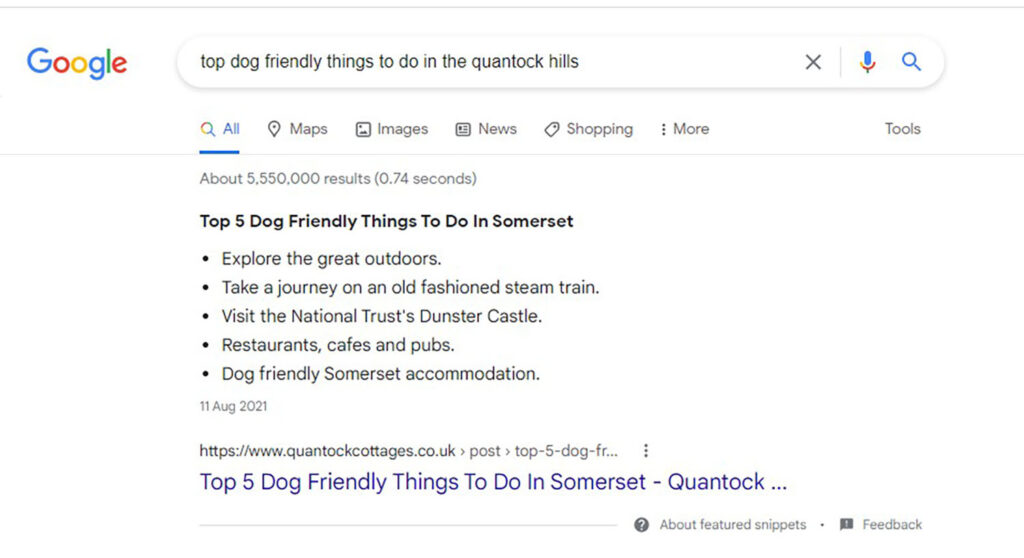
Providing people with what they need in a way that is well written, well-structured and incorporates high quality SEO practices is the way to achieve a featured snippet in Google search results, which is known as position zero and is displayed in a helpful list format, above the highest ranked organic results, and even above paid adverts. If you would like to see an example of a featured snippet, here’s one that we achieved for a client, for a very important search term for their business.

A Google Featured Snippet that we achieved for a client

3. Keeping your website content up to date and user friendly

This is very important when it comes to writing quality SEO content, as just like your audience will be put off by content that’s salesy, they will get frustrated and likely leave if your content is out of date. Of course some content will be very specific to the time that it was written, but if you are planning on using evergreen content, or old content is no longer valid then you will need to make sure it stays up to date if someone were to land on the page now. Also search engines rank pages highly when they are kept up to date with fresh information.

One final tip to complement your SEO copy

Don’t stop at publishing well written, audience centred copy, please take time to check that once they’ve read your content that your visitors can then take action. Make sure that your contact details are easy to find, that your contact forms work, or that your email address and phone number is clickable. Ensure your price list, menu or other important pages are easy to find and read and so on, and very importantly that every part of your website is mobile friendly, has clear images and videos and that it loads quickly. You want to make the user journey from landing on the correct page based on a search query, to reading your content and getting in contact as smooth and easy as possible.

Hopefully you found some great tips to help you with your SEO copywriting. Now, we understand that not everyone is a writer, and many business owners will not have time to write great copy for their website and keep it fresh as it can be very time consuming. So please get in touch with us at Q Social Media if you need any expert help with SEO copywriting or SEO in the back end of your website.

Top 3 digital marketing trends for small businesses in 2023

With costs rising it’s important now more than ever to get the most out of your marketing spend, so we’ve rounded up the top three digital marketing trends of 2023 to help small businesses stand out online. We’ve chosen our top three trends, not only because they are simple for small businesses to implement, but if you continue to work on them they will benefit your business in years to come.

  1. Publish valuable content

2023 looks to be the year where quality content is put first. This 2023 digital marketing trend is actually not new at all, yet it’s something that has and continues to be what we believe is extremely important to the success of your digital marketing activities and that’s publishing valuable content. One of the best tips we can give small businesses is to avoid salesy content where possible and to move towards content that your audience really cares about. Having your own blogs and original content on your website that’s helpful to your audience is vital if you want to stand out. Also don’t be afraid to share content created by others on your social media channels if it would benefit your followers. Not only will this save you from having to create original content each time, but it actually shows that you care about your customers by giving them content that’s important to them, no matter where it came from.

This year there is set to be a shift for businesses to move away from placing importance on the number of followers they have on social media to sharing content that truly matters. Digital marketing expert Neal Schaffer says: “Since COVID we’ve seen a new social media culture that focuses not on the number of followers, but on the content itself”. Helpful content is not just for sharing on social media, it needs to be published on your website too to help with Search Engine Optimisation (SEO). Google published a ‘helpful content update’ in summer 2022, where it says that to stand out in search results, businesses must create ‘more original, helpful content written by people, for people’. Creating valuable content for SEO purposes is something that we are very passionate about at Q Social Media. It’s also a whole other topic in itself, and one that we will be discussing in our next blog, so please keep an eye out for that. 

Here’s our top tips to consider when creating or sharing valuable and helpful content:

  • Put yourself in your audiences’ shoes. What do they care about, what will help them? Then create content around those subject areas
  • Is your content written by subject matter experts? If not then it should be as Google ranks this highly on websites. It’s also a great opportunity to show off your team and therefore your business as a whole, by having team members write a blog for example around their own area of expertise, or you could team up with an influencer and guide them on creating content and have them share it to their (relevant) audience
  • Give your audience what they need, but Keep it relevant to your business. All of your content should be relevant to your business in some way. For example, say you own a bike repair shop and you want to run a competition on your social media channels. You may think that giving away a John Lewis gift voucher will help attract people, and while it may gain likes and shares, it could be the wrong audience. So giving away something like a free bike health check will ensure that you are getting your business in front of the exact audience that you need – people that own bikes.

2. Look out for signals from your audience

This 2023 trend ties in nicely with the above and that is to look out for signals from your audience, in other words what are they asking for? Being able to analyse digital marketing data such as the number of new followers and website visits is one of the reasons digital marketing is so great for small businesses, but actually knowing what your audience wants and providing it, will set you apart. If you take a look, your audience is literally telling you what they want from you. You can see this in your Facebook, Google and Trust Pilot reviews, in customer service emails and in conversations on social media and so on. Find out what they want and provide it in the form of content (as well as what you are offering them through your products or services). If for example you don’t have many followers on social media or Google reviews yet, then take a look at your competitors’ reviews and what their audience like and dislikes about their business.   

3. Team up with influencers and content creators

You may be tempted to leave this out of your strategy when times are tough, but thinking about the points above it’s great to have others talking positively about your business, and you can do this through an influencer partnership. Again, influencer marketing is nothing new, but more and more smaller businesses are jumping on this trend. You don’t have to approach someone with a huge following, just someone that aligns with the values of your businesses and who’s audience you can help with your products or services.  

As you can see, these three trends have all been around for a while, but that only shows how vital it is for small businesses to be authentic and helpful to their online audience, in order to turn them into loyal customers.

Finally, another 2023 trend we could see working well for small businesses when researching keywords for new content is to include low search volume keywords. Rather than competing for online space with keywords that are already popular, the idea behind this trend is to get ahead before they become popular. A great way to do this is say for example if you are writing content for a page on your website, or writing a blog is to choose some popular keywords and some that are low volume and (seamlessly) incorporate those keywords into the wording.

Google updates

There’s also some Google updates that we thought you should know about to help with your digital marketing in 2023.

Last summer a new version of Google Shopping Ads called Performance Max (or PMax) went live and this year will be all about optimising your PMax campaigns. This version of Shopping Ads is perfect if you want your business to appear across all of Google’s platforms, including YouTube, Gmail, Shopping, and Search. It’s a great advertising option if you have specific conversion goals such as leads or sales. To increase conversions, the key is to break out campaigns by product categories, so that each campaign is highly targeted and to update the Audience Signals, which is a feature that allows you to suggest customer segments. This helps Google’s learning algorithms to show your ads to the right people.

In July 2023 Google is launching a new version of Google Analytics. Google Analytics 4 will collect event based data (a method of tracking and analysing interactions between users and your products) from websites and apps to better understand the customer journey. This new version takes into account ‘cookieless’ measurement (the use of website cookies where users accept or decline their online behaviour being tracked is going away – we will no longer be able to track them). If you would like to set up Google Analytics 4, click here.  

If you need expert support with your digital marketing in 2023 please get in touch with us at Q Social Media.

5 easy SEO fixes to get your website seen

Are you struggling to get your website onto page 1 for your most important keywords? There might be some easy ways you can help your website creep up the organic search results in Google. We work with multiple clients to help with their Search Engine Optimisation (SEO). Based on our experience, here’s our top tips on easy SEO fixes.

Identifying Keywords

What are the keywords which you want your website to appear for? Brainstorm, make a list and check how often these keywords appear on your site. Google wants to show people the most relevant results, so if your website doesn’t contain many, or any, references to your key products or services you’ll appear much lower down the organic results, or worse, not at all!

Google Keyword Planner

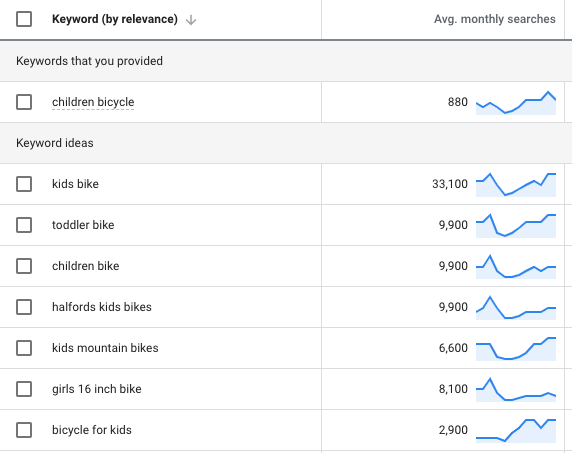
Following on from this theme, make sure you’ve done your research in Google Keyword Planner. Whilst you might think people are searching for “children’s bicycles” and have therefore inserted this phrase lots of times on your website, a quick search in the Keyword Planner will tell you otherwise! The results which come up suggest that the closest popular match for that phrase is “children bicycle” at 880 searches a month, but by far the most popular term is “kids bike” at 33,100 searches a month – that’s the phrase which deserves more focus as a website SEO keyword.

For ideas on what are the most popular search terms used for a certain product, Google Keyword Planner is an essential tool.

Name your Images

You might have lots of images on your website showing products or key offerings, but if the images aren’t named in the alt text field, it doesn’t matter what they show – they won’t be picked up by Google! Although your site visitors can see an image, Google can’t. Your image needs to be named to help with SEO – it can then be crawled and filed by the Google spider.

Meta data

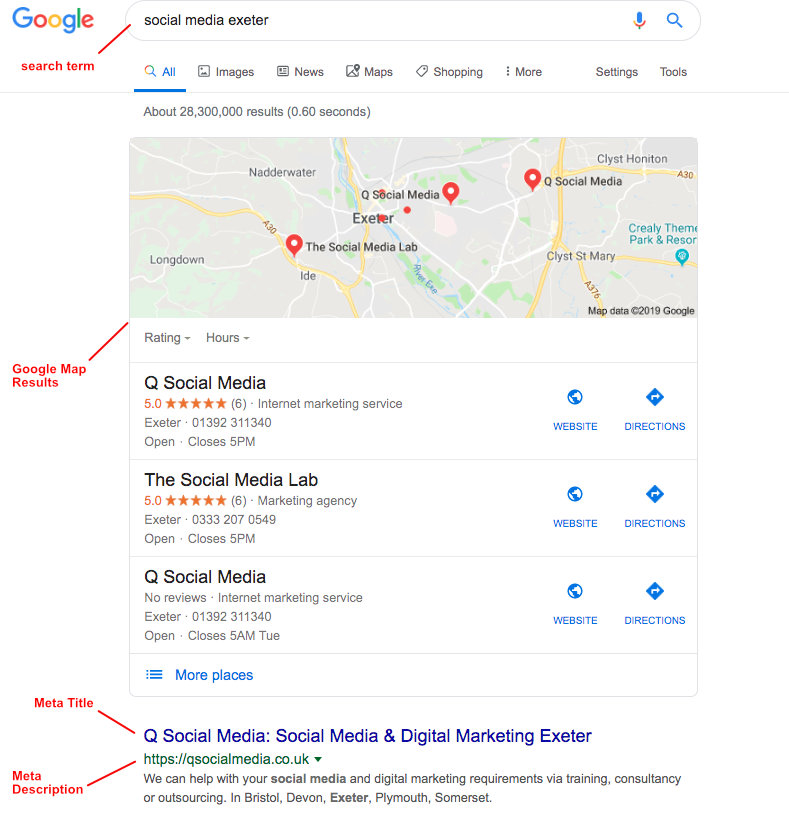
It’s also essential to provide accurate and concise descriptions of web page content for Google to understand what the page is about. This needs to be entered in the meta title and description for every page on your website. This information shouldn’t be spammy, since what you enter in here will generally appear in the Google search results, but it should contain key information about the product or service you are promoting on that page and ideally some of your main keywords as well.

Well thought out meta data will help to ensure your website appears for your top search terms, as in this search for “social media Exeter”.

Google My Business

As the above example shows, to make sure your website appears for location based search queries, you need to make sure your website has a fully filled in listing on Google My Business. Often the Google Map results (showing Google My Business info) are listed above the text based search results, so having your business listed geographically on Google My Business could make all the difference in getting it seen.

Whilst there are lots more ways to get your website seen by the people who matter to your business, here we’ve focused on some more simple fixes. We hope these tips help your business grow. For help with SEO advice or support, get in touch.

Why You’re Not Seeing Your Own Google Ads

Are you worried your Google Ads aren’t working because they don’t show up when you do a search for your main keywords on Google? Read on to find out why this isn’t a good way to check whether your ads are working and how it could actually damage your campaign.

Pay-per-click (PPC) advertising is an auction system with all of the bidding happening in real time. Hence carrying out one search isn’t an accurate way of determining whether your search terms are working – you would need to check over a larger period of time such as a week or month. Other advertisers will be bidding on the same keywords, so a search carried out at different times might have very different results.

The problem is, if you keep searching for your ad and not clicking on it you are inadvertently sending out signals to Google. Google search is very sophisticated and is tailored to the user who is carrying out the search. Therefore if you’ve searched for your ad in the past and not clicked on it (which is the action you would normally want people to take once they’ve searched for your keywords), this is sending information to Google that the ad isn’t relevant to you. You are hence much more likely to see competitor ads, especially if you have clicked on them before!

You could also end up damaging your own campaign if you repeatedly check your ads in this way. By sending messages to Google that your ad isn’t relevant to the search terms you’ve typed in you could actually lower your Quality Score and cause your cost-per-click to go up!

The best action to take if you want to know how your ads are performing is to ask the team responsible for your campaigns to provide a regular report, showing how your campaign is working over a longer period than a single search. If you do want to search regularly to see if your ads are working in real time you should use the ad preview tool within Google Ads. You can set parameters such as location and then see what ads would show at that moment in a real search. Since it’s a search simulator it isn’t actually serving ads so won’t take your search history into account.

We hope you found this blog post useful, for help or advice on Google Ads get in touch.

How to Improve Online Sales Using Social Media

Google Shopping Tips for Online Retailers

If you’re an online retailer who haven’t yet set up Google Shopping Ads, or want to find out how to make them work more effectively for your ecommerce business, read on!

Google Shopping campaigns put your product images, price and business name right in front of people using the Google search engine, making it great for retailers. The ads appear alongside Google search results when people search for the products you’re selling, making them a powerful way of attracting a potential buyer.

Whilst search engine ads are usually set up with a product category landing page, the thing that makes Google Shopping Ads so attractive is that they appear at product level, with product specific pricing, image and details, showing people much more specifically what they are looking for and taking them right to the product landing page.

Read on for some top tips on how to make Google Shopping Ads work for your online retail business.

Fill in Website Product Info

If you want your product to appear in the Google Shopping search results you need to make sure all the keywords you want your product to appear for are written in the website product title and description. Google matches search queries to the keywords in the title and description, so any products missing keywords won’t be picked up.

Example: If you sell Garden Sheds, make sure the word Garden Shed is in the product info. If the title of the product is ‘The Cumberland” and the product info describes it as a garden building, your ad won’t appear for searches for “Garden Sheds”, which is probably the most searched for keyword!

Add Negative Keywords

If running a standard Shopping campaign, just as you would in Google Search Ads, it is worth regularly scanning the search terms people have used which prompted Google to show your ads and adding in negative keywords as appropriate. This prevents your ads showing up for irrelevant searches, saving you money and maximizing your ROI by preventing wasted clicks.

Example: If you sell brand new bikes and someone searches for ‘second hand bikes’ or ‘hire bikes’ you would want to make ‘second hand’ and ‘hire’ negative keyword to prevent your ad from showing up for those search terms. You might also want to make more generic searches or competitor brand names negative searches, depending on your budget and strategy.

Be Selective

You can put all of your products on Google shopping by uploading your whole Google Feed. However, if you sell multiple varieties of the same thing, it might be worth being selective and just putting your best sellers up. 

Example: If we go back to garden sheds, this would mean that if someone searches for “Garden Sheds”, just your best selling standard size would come up on Google Shopping, rather than perhaps your small and extra large versions. In this way your own products are not competing with each other for views.

How to Get Started: So if you haven’t yet tried Google Shopping, ask your web developers to set up a feed of your products that goes into Google Merchant Center. This then syncs with your Google Ad account to make a Pay-Per-Click campaign within Google Shopping.

The great thing about Google Shopping is that you only pay when people click through to visit your website or view your local inventory, making it very cost effective. Google Shopping ads work on all devices and will take people directly to where the specific product page is, making it easy for them to buy.

If already running Google Shopping and regularly gaining conversions (over 30 a month) you may want to consider the Performance Max setup. Google will use the conversion history data to manage the campaign for you via their algorithms. There’s then no need to check search queries or update negative keyword lists. This can lead to more conversions and improved returns.

If you need any help setting up or managing a Google Shopping account for your online shop get in touch. We currently work with clients both locally, in Exeter and Devon, as well as UK wide.

Google Responsive Display Ads – What you need to know

What are Google Responsive Display Ads?

If you’re a business owner, responsive display ads will make your life easier. Simply write your ad, upload your logo and images and Google will show your ad on relevant websites of you choosing or re-market your website to people who have viewed it previously and will adapt the size, appearance and format of the advert accordingly to suit the website they are browsing.

What’s the difference between Responsive Display Ads and Standard Display Ads?

Both allow you to target people that visit certain websites or to re-target people that have visited specific pages of your own website. If you’ve used display ads before you will know that you need to design your ad and save it in various sizes to fit the ad space on a range of websites. The great thing about responsive ads is that there’s no designing involved, simply upload your images and logos and Google will adjust the size of the ad to fit it to the ad space.

Why should you use responsive ads?

They are easy to create, with no design time involved and Google does the work for you. If you are a small business owner, we think they are the perfect solution for those who do not have the time or expertise to design their adverts or the resources to hire a designer. Even if you have used standard display ads in the past, you may have found that you didn’t have the time to create all of the sizes required, which means you could have lost out on potential ad views and clicks.

If you have a YouTube Channel and a video you want to show off in your ads you can do this with responsive display ads. You can upload short video clips, along with at least one image and Google will show your videos whenever they determine that they will perform better than the images in your ad.

Lastly, here at Q Social Media we have seen positive results since moving our clients over to responsive ads. These include a reduced cost per click, allowing more ad clicks for their budget and often 10% to 30% more ad clicks which is really encouraging.

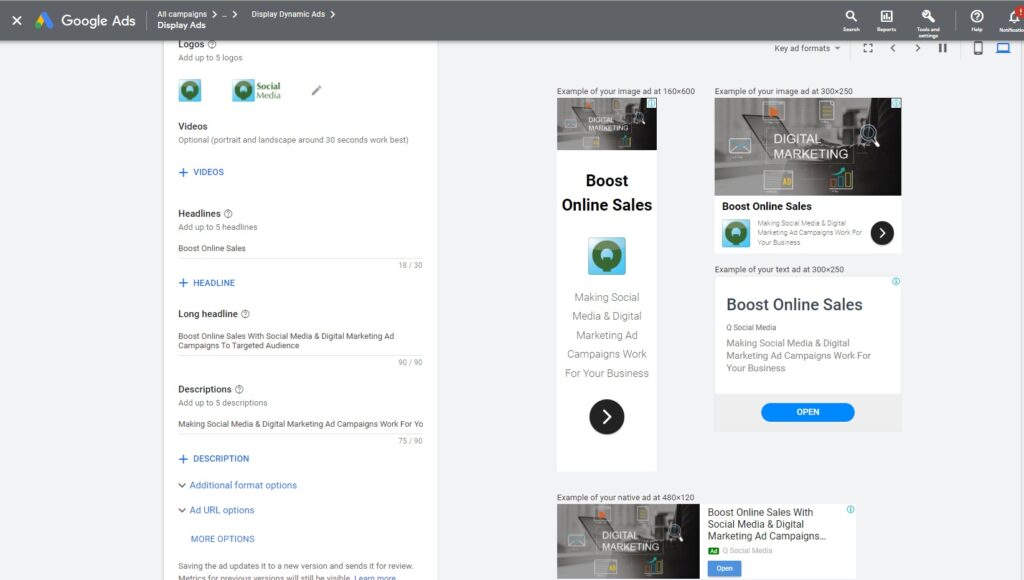
Here’s an example of what the set up of a responsive display ad looks like:

Are there any cons?

If you’ve used display ads before then you may feel like you’re losing a bit of control with the changing format of responsive ads. If for example you have a very strong brand and want this reflected in your ads, then you may want to stick with standard display ads where you have complete control over your branding.

Google will also move the headlines and descriptions around in responsive ads, so you will always need to make sure that they make sense no matter what order they appear in. This could be another reason to stay with standard display ads, if you need to be very particular with your wording. If you can be flexible though, we suggest just giving them a go to see if they work well for your business.

We hope you found this useful and if you need help setting up and managing your Google Ads please contact us at Q Social Media, and we will be able to determine which ads are the best fit your business.

Google Responsive Search Ads

Google Responsive Search Ads Explained

Do you use Google Ads for your business? If so and you’ve been running Expanded Text Search Ads then you may have seen a message that says ‘Starting 30 June 2022, you’ll no longer be able to create or edit Expanded Text Ads’. You can continue to use them and report on them, but after this date you won’t be able to edit them at all. Let us explain what the new default Responsive Search Ads are and how you can easily switch over to them. 

What are Google Responsive Search Ads?

Rather than Expanded Text Search Ads which are static, Responsive Ads move the headlines and descriptions around to determine which would be the best combination to show based on the search term that each individual has entered. While this approach may feel like you have less control over your Ads, a big positive is that you don’t have to test different versions to see which ones perform the best, as Google shows the best version of each Ad in relation to the search term. Google believes that by using machine learning it can improve campaign performance in terms of clicks and conversions. We were a bit sceptical ourselves at first due to the lack of control, yet here at Q Social Media we have only seen positive results since moving our clients over to responsive ads. These include a reduced cost per click, allowing more Ad clicks for the budget and often 10% to 30% more Ad clicks which is fantastic. Another bonus is there is also more space for text with Responsive Ads, with room for up to 15 headlines and 4 descriptions (expanded text ads have up to 3 headlines and 2 descriptions).

How to switch over from Expanded Text Search Ads to Responsive Search Ads

It’s very simple to switch over. We recommend going into each search campaign and then the Ad Groups that you have running. Click on ‘edit’ next to an Ad and copy the URLs, pathways, headlines and descriptions in to a Word document. Now create a new Responsive Ad. You have an opportunity here to refresh your ads, by adding, removing and updating wording, which is a great exercise to do anyway. Save your new Responsive Ads and either pause or remove the old Expanded Text Ads.   


See our top tips for getting the most out of your Google Responsive Search Ads below.

Some helpful tips for Responsive Search Ads 

  1. You can actually pin 3 headlines and 2 descriptions in place and while it may be tempting to do this to gain back some control, we wouldn’t recommend it as it defeats the point of Google showing the best wording to an individual based on their search. You could pin your most important headline though if you wanted to try it out, for example if you wanted a headline with your business name to always appear at the top. But just remember to test whether this works well for you or not and if not, then un-pin it
  2. While Google’s machine learning works to serve the best headlines and descriptions to each  individual, we still recommend regularly viewing and refreshing your ads when needed, especially if you’re running special offers
  3. As the headlines and descriptions can be shown in any order, have a read first to check they make sense no matter what order they end up in. You can do this when creating your Ad. To the right in the preview section it shows you different combinations of your ad on rotation
  4. This may seem obvious but please check spelling and grammar before making an Ad live, as any mistakes can harm your Ads’ performance. This is why it’s helpful to paste your original Ad wording into a Word document before setting up your new Responsive Ads, so you can take advantage of the spell check
  5. This is just a general tip for all your Ads, make sure to use similar wording in your Ad to what’s on your landing page for continuity for the user (so they have a very clear idea of what the landing page will be about and knowing that it will be relevant to them) and to help boost your Ads’ quality score.

We hope you found this information helpful and if you need any help with either setting up or managing your Google Responsive Search Ads or you simply don’t have time to do it yourself, then please contact us at Q Social Media.   

How Online and Offline Retail can Work Together to Increase Sales

There’s no doubt that people’s shopping habits have changed in the last decade, as online shopping has become easier and more convenient. The Covid pandemic then increased the popularity of ecommerce, as people were forced to stay at home and shop.

However, whilst some major brands are closing their stores and there is much talk about ‘the death of the High Street’, some ecommerce brands are actually opening physical stores. So what’s going on and how can brands who have a physical store make online and offline retail work together to increase sales?

Think Mobile

The convenience of shopping on mobile devices has shifted the way people shop. People no longer need to make a dedicated trip to the High Street to make everyday purchases. It’s much too easy for time poor shoppers to make simple purchases from their mobile phone, and reluctant online shoppers have been forced into new behaviours during multiple lockdowns. The days of heading into town with a shopping list of mundane items are waning.

Customer Experience

Today, brands need to make their online and offline retail strategies work together and the buzz word for bricks and mortar stores is ‘experience’. If you think Apple and Ikea, you’re starting to get a sense of what this means in reality. These brands have a close integration between digital and offline, with physical stores offering a chance to touch, see, feel and experience products, whilst online offers the chance for customers who know what they want to buy easily. It also complements the offline experience by making it easy for customers to see the benefits of visiting the physical store, the product range, the locations of stores etc.

How to Improve your Digital Strategy

Whilst many smaller brands don’t have the luxury of completely redesigning their stores and entire shopping experience, there are things which can be done to improve the integration of online and offline and we’ve listed a few below.

1 Use Digital Campaigns to Get People In Store

If you have a physical store and want to get people to it, a digital strategy to draw people in store as well as allowing them to buy online is essential. If it is not possible to buy your products online (for example, they are bespoke or not suitable for postage) your digital strategy must strongly focus on getting people in-store.

One really useful way to do this are Google Display campaigns. They allow you to raise awareness of your store and products to people in the vicinity who may not otherwise have heard of you. Display campaigns can show your ads to people based on what keywords they have previously been searching for. Say, for example, you sell cycling gear in Exeter, you could attract local or visiting cyclists to your store by targeting people who have recently searched for things like  ‘cycling routes Exeter’ or ‘bike trails Devon’. You can also use Facebook Ads to encourage people to visit your shop by targeting local people and helping them find your shop easily.

2) Use Digital to Push your Expertise

Give people a reason to visit you in-store by making it clear what can they get from your physical store which they can’t get from buying online. Expertise is one area you should be pushing. Make sure your online presence pushes the knowledge and expertise people can get from you by visiting in person. If your audience is national and your store quite remote you also need to push your communication channels for webchat and/or telephone. Help people feel confident that a visit to your physical store is worth their while and will help in their decision making process.

3) Push your In-Store Experience

If you want people to visit your store are you making it easy for them to understand what you offer and how a visit will help them? Look at your website from your customer’s point of view – is there a clear, navigable page selling your in-store experience? Does it push all the advantages of a visit (e.g. how people can see, feel, touch, understand better the products)? Is it easy to see where your store is, especially from a mobile, and does it link through to Google maps so people can navigate there easily. Make sure you’re not losing customers through a poor website experience – if you’re a showroom amongst several in an area, that mobile phone user browsing for your product might just head somewhere else if they can’t easily see your location, opening hours, USP and product range.

4) Solve Customers Problems

Give people a reason to visit you by helping them with their questions and concerns. What do you frequently get asked? Make sure the answers to these questions are on your website, either as clear copy/navigable areas or as blog posts which you can share on social media. If you’re helping people solve their problems you’re halfway to a new customer.

5) Remarketing

Remarketing is a great way to have another go at marketing to people who have already shown an interest in your products. Read 4 Reasons Remarketing is Essential for Successful Marketeers and Get Ahead by Targeting your Competitor’s Website Visitors which cover this area in some detail. In terms of how remarketing can help bring people to your physical store, it can encourage people who have visited your website showroom page (or those of local competitors) to visit by reminding them of who you are and what you offer. Remarketing ads can be set up on Google, Twitter and Facebook.

The future of retail is in a strong collaboration and unity between online and offline. An understanding of the strengths and weaknesses of both ways of shopping and the ability and willingness to make sure each complements the other are essential. To have a strong foothold in the future of retail make sure your online and offline strategies are working together and always putting your customers and their needs first.

How to Sell to your Target Audience Online

If you have an ecommerce store and you’re not making many sales, or you think there’s potential to make a lot more, read on!

In this blog post we run through our top tips and basic strategy for ensuring your online store has the best chance of making those all important sales.

Define Your Audience

Firstly you need to define your audience. Who are your primary customers, thinking about demographics, location, where do they spend time online, when are they online and on what devices?

You might have existing data which could help with this, either from Google Analytics or from your order data.

Use this information to help build your online marketing strategy.

Create a compelling offer.

You might think you have a compelling offer, but there are two main ways of researching whether that’s the case.

One is by carrying out some research on your customers. You could do this by surveying them directly or by noting reviews and feedback via your social media channels. You could also analyse website data to see whether you have a lot of abandoned sales or a high bounce rate.

The other is by having a look at your competitors. Is your offer really as good as theirs?

For example, if your target audience is mainly driven by price and you are selling a generic, rather than unique product, it’s not going to be a compelling offer if your product costs more than your competitors or has a longer delivery time.

Be clear about what makes your offer more compelling and make sure your USP comes across in all of your marketing material.

Reach your Target Audience with your Compelling Offer

This might sound obvious, but way too often we see clients who know who their audience is, have defined their offer, but are still not reaching the right people with the right message.

This is generally because they are struggling on the technical side of digital marketing. Here’s some basic tips on the four main platforms we assist ecommerce clients with:

#Tip 1: Google Shopping To make sure your products appear when someone searches for them on Google Shopping, ensure all the keywords you want your product to appear for are written in the website product title and description. More Google Shopping Tips here.

#Tip 2: Facebook Ads Make sure your campaign is set up with the right objective. If you’ve been wondering why your website click cost is £10, it’s probably because you’ve set it up wrong!

#Tip 3: Twitter Ads A really useful targeting option on Twitter Ads is the ability to target followers of competitor profiles. This is really useful if you’re a much smaller player than many of your competitors, since it allows you to speak to your target audience, even if they haven’t yet discovered your brand.

#Tip 4: Email Marketing Assuming that your email marketing is already being sent out to your target audience, it’s really important to not only have clear calls to action, but to make sure they land on the relevant pages of your website.

Understand the Customer Journey

To have the best chance of making sales it’s worth understanding more about the customer journey.

Although sometimes people search for a product and buy straightaway, this is generally not the case, especially for higher value products.

If you want to make sure people are reminded of your products, remarketing is a powerful tool. Remarketing works by retargeting your website customers with adverts about your business as they browse the web. Don’t let them forget your website and your products!

If you’re new to remarketing, we’ve written more about this powerful tool here.

For training or assistance with your digital marketing campaigns get in touch. We help retail clients with ecommerce stores both large and small from Exeter, Devon and across the UK. Let us know if we can help you.