Your Trusted Digital Marketing Agency

Author: Chris Wood

Small business digital marketing success in 2024 - 5 powerful tips

Small business digital marketing success – 5 powerful tips

The digital marketing landscape is constantly evolving and small businesses need to adapt to stay ahead. In this blog we are giving 5 powerful digital marketing tips to help your small business to thrive online.

1. Personalise the customer journey

Just using a customer’s name is no longer consider personalisation. Advanced tools powered by AI and machine learning can help you to truly understand your audience. Analyse data, behaviours and preferences to tailor content, offers and recommendations to them for a hyper-personalised experience. Imagine receiving product suggestions you genuinely want, not generic promotions. This helps to foster a positive brand relationship by making customers feel valued and understood. If you want to discover 5 easy ways to use AI in your digital marketing, check out our blog here.

2. Create short form videos

Short form video marketing on platforms like Instagram Reels and YouTube Shorts is super popular and for good reason. These short clips grab attention quickly and perfectly suit our fast paced digital lives. You really don’t need to spend a lot either, just focus on authenticity, creativity and understanding your audience. Consider live streaming to connect with your audience in real time and explore interactive elements of your social media platforms to help boost engagement. Video marketing isn’t just a fad, it’s a powerful digital marketing tool for brand storytelling and emotional connection with audiences, that’s here to stay.

3. Local & micro influencer marketing

Don’t be put off by using influencers. Influencer marketing is all about local influencers, micro influencers and authenticity, which is absolutely perfect for small businesses. What better way to show off your products and services than to have a local influencer give their honest feedback? These influencers might not have a huge following, but they will have a dedicated and engaged audience, perhaps within a specific niche. Partnering with micro influencers allows for a more genuine brand connection. Their followers trust their recommendations, making the partnership feel more real. Building authentic relationships with influencers involves understanding their values and ensuring they align with your brand, so that you are truly reaching the right audience. Always remember, it’s about connection, not just their follower count.

4. AI chatbots – big benefits for small businesses

AI powered chatbots aren’t just for large companies. Small businesses can leverage chatbots to significantly enhance their customer service offering and audience engagement. Chatbots can answer to routine inquiries, reply instantly and even offer personalised recommendations. Imagine a potential customer getting instant answers on your website through a helpful chatbot. This improves user experience and frees up your customer service team for more complex tasks.

5. Leverage voice search language for search engine optimisation (SEO)

With the rise of voice assistants like Alexa and Google Home devices, voice search is becoming increasingly popular. People use their voices to search for information, and small businesses can use this to their advantage. Optimise content on your website for voice search by incorporating conversational keywords and thinking about natural speaking patterns. Imagine how your customers might ask questions verbally instead of typing it into Google. Creating content with voice search in mind can improve your search engine visibility and help to reach a wider audience. If you can create content such as micro blogs or social media posts that directly answer common voice search queries related to your business, then this will help to position your small business as a valuable information resource.

We hope you found these 5 powerful digital marketing tips helpful and can find ways to implement them into your business. By personalising the customer journey, embracing short form videos and influencer marketing and optimising for voice search you’ll be well on your way to standing out against your competitors and driving growth. If you need any expert help with your digital marketing on Google & Facebook Ads, please check out our range of services.

unleash the power of LinkedIn

Unleash the Power of LinkedIn: Top Tips and Best Practices for Success

LinkedIn isn’t just an online C.V anymore, it’s a vibrant professional ecosystem brimming with opportunities for connection, growth and establishing yourself as an industry expert. But navigating this platform can be tricky, especially as a busy business owner. How do you ensure your voice cuts through the noise and achieves your professional goals?

In this blog we are giving our top tips and discuss LinkedIn best practices, to make the platform work for you.

Create a profile that commands attention

  • Headline – Ditch the generic title. Craft a clear, concise headline that showcases your expertise and value proposition. This could be something like ‘Social Media Marketing Expert’ instead of ‘Marketing Manager’
  • Keywords – Sprinkle your profile with relevant keywords that potential employers, clients, or collaborators might search for. This increases your discoverability in LinkedIn searches
  • Visual appeal – A professional photo and a high quality banner image that reflects your brand or industry will create a strong first impression.

Content is King

Sharing valuable content and building relationships is the key to success on LinkedIn. Here’s how to create valuable content that people will take notice of:

  • Know your audience – Tailor your content to the specific needs and interests of your target audience. What are their pain points? What solutions can you offer?
  • Use different content formats – Experiment with different content formats to keep your audience engaged. Articles, infographics, videos, and polls are all great options
  • Post regularly – Consistency is key. Maintain a regular posting schedule to stay top-of-mind with your network
  • Engage and respond – Don’t just broadcast, be present. Actively participate in discussions, respond to comments and answer questions. This fosters trust and builds relationships
  • Thought leadership spotlight – Share your industry knowledge by publishing original articles or participate in LinkedIn Live sessions.

Leverage the power of LinkedIn’s features

  • Groups – Join industry specific groups to connect with potential clients, collaborators, or employers. Share your expertise and participate in discussions to position yourself as a thought leader
  • Company page for businesses – Create a dedicated Company Page for your business. Highlight your brand story, showcase your products or services and share company updates to keep your audience engaged.
  • Sales navigator – (for sales focused professionals) – Upgrade to Sales Navigator to unlock advanced search filters and lead generation features. Find decision makers and personalise your outreach for maximum impact.

Make date driven decisions

Track and analyse your LinkedIn performance. Monitor your LinkedIn analytics to see what content resonates with your audience and what adjustments need to be made.

Be human, not a robot

People connect with people. Let your personality shine through in your interactions. Share your unique perspective, celebrate your achievements and offer congratulations to others in your network. A human touch goes a long way in building relationships online.

Best practices for networking and engagement on LinkedIn

  • Connect strategically – Don’t just add everyone – focus on building connections with people in your industry, potential employers, clients, or collaborators
  • Personalise your invitations – A generic connection request is forgettable. Write a personalised message that explains why you’d like to connect
  • Engage with industry influencers – Like, comment on and share content from industry leaders to increase your visibility and help to build relationships
  • Participate in relevant conversations – Join discussions in relevant groups and offer your insights. This will help to establish you as a thought leader and position you as a valuable connection
  • Showcase your accomplishments – Did you win an award or achieve a milestone? Share your successes on LinkedIn to build credibility and establish yourself as an industry expert.

By following these top tips and LinkedIn best practices, you’ll be well on your way to turning your LinkedIn presence into a powerful tool for career advancement, thought leadership and professional success. Remember, success on LinkedIn is a marathon, not a sprint. Be patient, stay consistent and keep building valuable connections.

We hope you found this blog helpful. As a busy business owner we understand how it can be difficult to put your all into marketing your business, so if you need any expert help with your digital marketing then please contact us at Q Social Media.

Improve local search rankings

Simple tips for businesses looking to improve their local search rankings

In today’s digital age, having a robust online presence is vital for any business aiming to thrive in the competitive marketplace. One of the most effective strategies for enhancing online visibility, especially for brick and mortar establishments, is through local search engine optimisation (SEO). Local SEO focuses on optimising a business’s online presence to attract more foot traffic and customers from relevant local searches. By implementing targeted techniques, businesses can significantly improve their local SEO rankings and attract more customers from their local area. Here are 5 simple, actionable tips for businesses looking to enhance their local SEO.

  1. Claim and optimise your Google My Business listing

This is probably our most important tip – to claim and optimise your Google My Business (GMB) listing. So many listings go unclaimed and these businesses are losing out on boosting their local search rankings. To find your listing, type your company address into Google and click on ‘claim this business’. Then make sure you add all of your business information including your business name, address, phone number, website URL, business hours and so on. Regularly update your GMB profile with high quality images and posts, just like you would on your social media accounts, and don’t forget to update any out of date information. Just implementing this one simple tip will give your local SEO a boost and will enhance your business’s credibility for the people who are searching.

2. Optimise your website for local keywords

Conduct keyword research to identify relevant local keywords that potential customers are using to find businesses like yours. Incorporate these keywords naturally into your website’s content and in the back end of your website for the focus keyword, meta titles, meta descriptions, image ALT text and URLs. You could even create location-specific landing pages or blogs to further improve your local SEO. The more quality content you have on your website naturally incorporating the local area, the more you will improve your visibility for local searches. An example of this would be if you have a hotel or holiday cottages you could create a blog on the best places to eat in the local area or create an FAQ page on your website listing local walks, beaches and pubs for example. 

3. Consistent business information across all online platforms

This is a very simple tip indeed, but that is to ensure consistency of contact details across all online platforms, as it’s is crucial for local SEO. Not only does it help your customers to find you but shows Google that your business is genuine and kept up to date. Platforms include your website, GMB listing, social media profiles, local directories and any other online platforms your business is listed on.

4. Earn Positive Reviews

Online reviews play a significant role in influencing consumers’ purchasing decisions and can positively impact your local SEO rankings. Encourage satisfied customers to leave positive reviews on platforms like Google, Facebook, Trustpilot and industry specific review sites. Respond promptly and professionally to all reviews, whether positive or negative, to demonstrate your commitment to customer satisfaction.

5. Local link building

When creating local content for your site, you will want to include high quality links to other local businesses. Not only will this ensure you have good content building up on your website about the local area, but it will encourage those local businesses to do the same for you. You can also help to gain quality backlinks from reputable local websites to your own by:

  • Looking for opportunities to collaborate with local businesses
  • Sponsoring local events or charities
  • Participating in community initiatives
  • Creating valuable local content that others would want to link to

Our final piece of advice for those wanting to boost their local SEO is to optimise your website for mobile devices. With the increasing number of people using mobiles for local searches, optimising your website for mobile is no longer optional. If you have a brick and mortar location then many of your potential customers will do a search on their mobile when they are in the local area, so this is an absolute must in order to appear in local results. Ensure that your website is mobile friendly, loads quickly and provides a smooth user journey. Google prioritises mobile friendly websites in its search results and penalises those that aren’t, making mobile optimisation essential for local SEO success.

By implementing these simple tips, businesses can enhance their local SEO efforts and increase their visibility in local search results. Improving local SEO not only helps attract more foot traffic and customers to physical locations but also strengthens the overall online presence and credibility of a business. We hope you found these tips useful and if you need expert help to improve your local SEO, please get in touch with us at Q Social Media.  

5 simple blogging tips for busy business owners

We all know how important blogs are. When they done well, they help with search engine rankings, provide valuable content for customers and potential customers, help people to learn more about your business, provide content for social media, help to position your business as an industry expert and the list goes on and on. That being said, at Q Social Media we know that busy business owners may not always have the time to get the most out of blog writing, so we want to share with you our top 5 very simple blogging tips with you.

  1. Know your audience

Who are you trying to reach? What are their pain points and desires? Tailor your content to resonate with them, answer their questions and offer solutions through your blogs, and therefore your business. If you are struggling to come up with ideas for blogs, a huge tip is to have a very careful look through your reviews (which hopefully you are doing anyway). These could be testimonials that have been sent to you, Google and Facebook reviews and so on. Positive reviews will help you to understand what your customers want to see more of, which can help you to build up a list of blog topics. Also if you happen to have any negative reviews you can use these to truly understand your customers’ pain points and you can build topics around them too. Just as a side note, please always respond to reviews, good or bad to show customers that you are really listening.

2. Share your knowledge

Sharing your knowledge through a blog is a fantastic way to establish yourself as an expert, connect with your audience and even grow your business. It’s also a faster way to tackle blog writing, as it’s much quicker to write about subjects that you have knowledge on and are passionate about, and don’t need to spend a lot of time researching. The great thing about this? Not only it a quicker way to write blogs, but Google ranks websites that are written by experts very highly. So if your website has this function, be sure to publish yourself as the author of the blog each time.

3. Leverage Artificial Intelligence (AI)

We actually talked about AI in this blog – 5 easy ways to start using AI in your digital marketing, and it’s a great way to help busy business owners with blogging in a few different ways:

  • As a tool to brainstorm blog ideas
  • To help with the structure of your blog
  • To repurpose old blogs – simply paste your old blog in and see what AI applications like Gemini (previously Bard) come up with

As we mentioned in the last blog, please do not use AI to replace the human element of blog writing, simply use it to help you save time and to complement your work. Take ideas from it and put it into your own words.

4. Repurpose old blogs

Once you have published a blog, you don’t have to forget about it. In fact it’s almost a waste to leave it to get lost behind newer content. You can take older blogs and update them with new dates, information, statistics and insights, and anything else that may have changed throughout the blog. For example if you have a hotel and you blogged last year about the best things to do with the kids during half term in your area, why not use it again this year? Just be sure to change any dates and check all the links are still relevant and are working. Not only does this save you lots of time as you are not always having to write blogs from scratch, it also helps with search engine optimisation (SEO) as search engines love fresh content on websites.

You can repurpose old blogs in two ways. Either you can take the old blog and change the dates and old information (and don’t forget to change the published date in the back end of your website to now). Or you can leave the old blog where it is and you can take the ideas from the blog to write a new one quickly. This is a good option if your old blog is doing well and is still being searched for, but you’re struggling to come up with new content ideas. Lastly, you could even take a long blog and turn it into a few micro blogs, which takes us onto our next and final tip.

5. Embrace micro blogs

Turning an old longer blog into a few new micro blogs is a great idea for busy business owners. People don’t always have the time to read long blogs, so mixing up your content with some shorter blogs can work really well. So going back to the example of the half term blog you could take one of the top things to do and use it to create a micro blog on ‘our top attraction with the kids when it’s raining’ and focus on that one place from your list of things. You could quickly add some more information to pad it out and if you are really struggling with how short your micro blog looks on the page, you can add more images throughout to break up the wording. Your next micro blog leading up to half term week could be ‘top place to go with the kids when it’s sunny’, or ‘the best walk to do with the kids’ and so on.  

We hope you found this blog useful, and just as a last little tip. Don’t forget to fill out the SEO section of your blogs in the back end of your website and use analytics to see which blogs are performing well and which blog topics are getting engagement on your social media channels, so you know what your audience is interested in seeing more of. We understand that even armed with knowledge, sometimes you just don’t have the time. So if you need expert help with your digital marketing, please get in touch with us at Q Social Media.  

ways to use AI in digital marketing

5 easy ways to start using AI in your digital marketing

Artificial intelligence (AI) has quickly changed the digital marketing landscape. It can be a useful tool for brainstorming, helping to write content, creating videos and more. In this blog we are going to discuss 5 easy ways that you can begin to use AI in digital marketing. 

Why use AI in digital marketing?

Before we begin it’s important to discuss why you would use AI in digital marketing. AI has been around for a while for example in Google Ads where it can take different headlines and descriptions and show it to the right people at the right time to help get the best ROI. With the launch of applications such as Bard and ChatGBT, we are now are able to use AI ourselves and it can really help to make certain areas of digital marketing easier and more efficient.

  1. Brainstorming

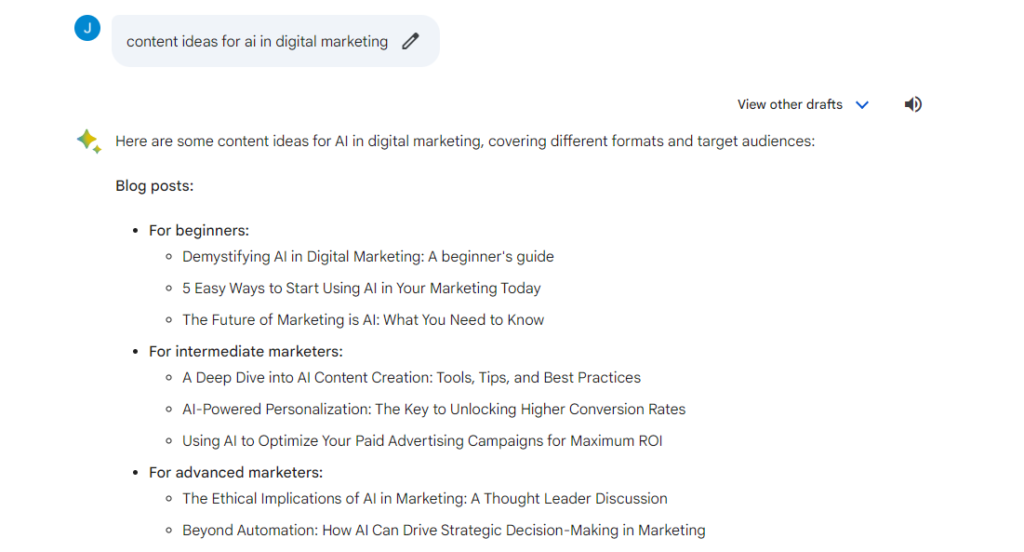
If you are a business owner you may feel stuck brainstorming blog content ideas or ideas for a social media campaign from time to time. This is where AI can help save you time and give you some great ideas that you may not have even thought of. A really simple way to do this is to go to an application like Bard and type in what you want generate ideas about, so for example ‘content ideas for AI in digital marketing’. Bard will then quickly generate a list of ideas for you. To give you a real life example, the title of this blog was originally ‘How to use AI in digital marketing’. But while researching for this blog, Bard gave a suggestion of ‘5 easy ways to start using AI in your marketing today’, which changed the direction of this blog to 5 easy ways to use AI, because who doesn’t like easy ways to do things in our busy lives? Here’s the results that came back:

2. Written content creation

Much like above, this is a very easy way to generate ideas for blogs, it can help you with ideas you might not have thought of, how to structure your blog and you can even use it to re-fresh old blogs. Simply copy and paste old blogs into AI applications and it will give you new versions of your old content to take ideas from. There are many more AI writing tools for blogs, here’s a great list. It can help you with any type of content creation, from social media posts to marketing emails and so much more.

If you are worried that using AI will mean losing the personal touch in your content, simply use it to help you, not to replace the human element. So for example if you typed in ‘write a blog on how to use AI in digital marketing’ don’t simply copy and paste. Just like you would with brainstorming, take ideas that you like from it and put it into your own words. Use it to complement your work, not to replace the human touch.

3. Video content creation

We all know that video performs well on social media posts, on websites and in online advertising. It’s a great way to showcase your brand and connect with people. However making videos can be a long and costly process. Luckily there are many tools that can help with video creation including text-to-speech generation, realistic AI voices, animations and more.

Designs.ai is a platform which helps small businesses in cutting costs and simplifying the workflow. It uses AI for creating and designing videos, customised logos, banners and graphics and more.

Pictory.ai is an easy and cost-effective AI tool to automatically create shareable videos from written content. This includes turning blog posts into videos and even long-form videos into shorter branded clips to be used on social media.

4. Email marketing personalisation

We all know that personalisation is so important when it comes to digital marketing. With all the numbers and data insights that digital marketing brings, it’s important not to forget that we are marketing our products and services to real people and they expect personalised experiences. So much so that 45% of consumers say they’re less likely to purchase from a brand after a non-personalised experience, and 27% would even stop using that brand altogether.

Want to know a really easy way to get started with using AI for personalisation? Use AI powered email marketing. AI and machine learning help to collect more data and analyse customer preferences to send out personalised emails that go far beyond just personalising a name. We recommend using easy to use email marketing platforms such as MailChimp, which you may already be familiar with, and which are powered by AI to send personalised email campaigns to your subscribers. You can also use other tools like Bard to generate content ideas for your emails.

5. Automated social media marketing

If you’re a small to medium size business AI tools can really help you to save time and effort when it comes to social media marketing, which we know many business owners struggle to find the time for. AI-powered tools can automate social media marketing tasks such as creating, designing and scheduling posts. You can even use it to analyse the audience engagement and measure performance using different metrics. Here’s a few AI social media tools we recommend:

  • Hootsuite – You may well already be using Hootsuite to schedule your social media posts, but did you know it now has an AI tool called OwlyWriter? It can quickly generate a new post based on a URL, giving you great ideas for posts, and helping you push out something really quickly. All you have to do is then give the content a human touch
  • Flick – Uses AI to help you turn content ideas into multiple posts. It has a ‘brainstorming’ ideas button where you enter your topic and it will begin sourcing general ideas for you
  • FeedHive – This is an AI powered social media tool that offers an AI writing assistant similar to ChatGPT. It can also help you take posts that you’ve already published and re-purpose them.  

We hope you found this blog useful and you can start implementing some of these AI capabilities into your business. If you need expert help with your digital marketing for Google and Facebook Ads then please get in touch with us at Q Social Media.

Shopify and Woocommerce

Discover why Shopify and WordPress WooCommerce sites are perfect for online retailers

Are you a retailer? If you sell products online then we want to let you know the reasons why Shopify and WordPress WooCommerce sites are absolutely perfect for increasing your online sales. Shopify and WordPress WooCommerce are two of the most popular ecommerce platforms for online retailers. Both platforms offer a wide range of features and integrations, such as being able to easily sync with Google Merchant Centre for Google PMax Shopping campaigns, GA4 (Google Analytics 4) for ecommerce tracking and Facebook for Catalog Ads, retargeting Ads and Shop.

Wondering which one is the best fit for your business? We break them down below:

Shopify

Shopify is a hosted ecommerce platform, which means that you don’t need to worry about managing your own web hosting or server. Shopify takes care of all of that for you, so you can focus on the most import thing – running your business. We think the great thing about Shopify is that it’s known for its ease of use, it’s built for the average user and it happens to have a wide range of features. It’s also very scalable, so it can grow with your business. Shopify is a subscription based software and their plans start from £25 per month for individuals and small businesses.

WordPress WooCommerce

WooCommerce is an open-source ecommerce plugin for WordPress. This means that it’s free to use, but you will need to provide your own web hosting and domain name. You can also integrate some of their premium add-ons to enhance your store’s functionality as your business grows. If you have a WordPress site then WooCommerce is the perfect plugin for you, as it can turn your site into a fully functioning ecommerce store in a matter of minutes. You’ll be able to manage your product inventory, track orders, handle shipping and oversee everything in your WordPress dashboard.

Syncing with Google Merchant Center, GA4, and Facebook

What better way to increase your online sales than to advertise to the people who want to buy from you? Shopify and WooCommerce both integrate perfectly with Google Merchant Center, GA4, and Facebook. This means that you can easily sync your product data and sales data with Shopify and WooCommerce platforms to create and manage your Google Shopping campaigns, website and ecommerce tracking, and Facebook Shop and Catalog Ads.

For example if you use Google Ads you can use Google Ads conversion tracking to track actions that people take once they’ve clicked on one of your Ads, so very importantly you’ll be able to see which Ads are generating the most online sales, so you can continue to improve your Ads and enhance your ROI.  If running Facebook Ads the Retargeting feature of Catalog Ads is a very effective way to drive sales, often people need to visit more than once prior to purchasing. This feature easily reminds website visitors of products they have viewed, encouraging more sales and improving ROI.

We think both of these platforms are great for online retailers, you just need to decide which one is the best fit for your business. If you want to stand out online, increase your online sales and need expert help with your Google and Facebook Ads and integrating them with your chosen software, then please get in touch with us at Q Social Media.

maximise online sales for christmas

Maximise your online sales in time for the festive season

If you’re a retailer looking to maximise your sales for Christmas here’s our top five tips for increasing online sales:

1. Set up and Optimise Google PMAX Shopping campaigns

If you have products to sell you will benefit from setting up Google PMAX Shopping Ads. They’re Google’s first fully automated Ad campaign type and they are ideal for showcasing your products in Google Shopping search results (product images) and making it easy for people to buy. The great thing is that the Ads also show up across Google’s entire Ad inventory (including display, search, YouTube, Gmail, Google Maps and more). Google uses its machine learning to get your Ads in front of the right people at the right time, so it’s a fantastic way to maximise your online sales leading up to Halloween and Christmas. You can read more about Google PMAX campaigns here in our blog.

2. Stay at the front of people’s minds with remarketing Ads

People do a lot of browsing in the run up to Christmas, looking for perfect gifts, festive home ware and decorations and much more. If you want to make sure people are seeing your products, remarketing is a powerful advertising tool. Remarketing works by retargeting your website visitors with Ads about your business as they browse the web. You can set up remarketing ads in Google, Facebook and Instagram.

Google’s remarketing Ads are great for targeting people who have visited your website but who have not yet purchased. Are you new to Google’s remarketing Ads? Here’s a really in depth blog by Search Engine Journal on how to launch your first Google Ads remarketing campaign.

We also recommend taking advantage of Facebook Catalogue Ads. These Ads show your products to your chosen audience on Facebook and/or Instagram. The great thing about them is they are personalised to your audience, as they target people who have already interacted with your business. You could even choose to show your products to a broader audience who Facebook targets based on their behaviours, including people who have shown an interest in products that are similar to yours.

3. Increase your budget

This might sound obvious, but if you’re already running Google Ads and social media campaigns it will be worth increasing your spend leading up to and over the Christmas period to increase your chances of online sales. If your Ads are effective, the more you spend, the more sales you should make. Your targeting and Ad wording will need to be spot on if you are going to get a good ROI. So if you are new to online advertising, it’s best to test your Ads now, so that you are all properly set up as we head closer to Christmas. If you don’t have the time or expertise to set up and run your own Ads it’s best to hire an expert to do it for you.

4.  Email marketing/App push notifications

If you have taken the time to build up and nurture your email list, it is still a great way to get online sales. You need to stand out through the noise through of spammy emails and every other retailer who is doing the same thing. Create a compelling offer, keep the headline and body of the email clear and simple, with clear CTA’s and of course direct them to the right landing page.

If you have a mobile App then what better way to boost your online sales than to send offers direct to the people who have taken the time to download your App? Mobile push notifications are a great way to get your customers spending. We highly recommend doing an ‘App only’ offer or discount to make these customers feel valued.

5. Review your settings

Finally, make sure your budget isn’t being wasted by reviewing the setup of your Ad campaigns. Review your location settings, bids and search queries. By keeping on top of search queries and adding irrelevant ones as negative keywords you can really help to minimise wasted clicks and get the maximum return on your budget.

We hope you found these tips helpful and we wish you a successful trading period in the run up to Christmas. For help with managing and getting the most out of your advertising campaigns please get in touch with us at Q Social Media.

How to measure website and app user engagement in GA4

How to measure website and app user engagement in Google Analytics 4 (GA4)

If you struggled to measure user engagement on your website with the older version of Google Analytics (Universal Analytics) you were not alone, and you’ll be pleased to know there’s now a way to do that in GA4. Many web analysts were frustrated that the closest thing to measuring engagement was bounce rate, and of course they are not the same thing, funnily enough though they are measured the same way though (more info on this below). Now in GA4 we can measure ‘Engaged Sessions’ and in this blog we will cover all you need to know.

What is an Engaged Session in GA4?

The great news is that we can now measure user engagement which is a welcomed feature in GA4. So what is an Engaged Session? It’s defined as a session where a user has:

  1. Spent more than 10 seconds on your website or app
  2. Viewed two or more web pages/app screens
  3. Or had a conversion event which is an important interaction that you want a visitor to carry out (previously known as goals).

In the old Universal Analytics (UA) if a user spent 10 seconds on your website and then left this would be recorded as a bounce, yet in the new GA4 this is now considered an Engaged Session and counts towards your engagement rate. For example if a previous visitor is reading a blog on your website and then leaves, this would have previously been considered a bounce. Yet they may not have needed to browse other pages, as they have been there before, so now this is recorded as an engaged session.

GA4 doesn’t report on bounce rates, this is because GA4 collects event based data, focusing heavily on engagements and the positive actions that people take on your website or app. If bounce rate was something you found useful to know, we suggest now focusing on at what point visitors take key actions on your site. You can set up Events & Conversions via the Admin settings to track this, in addition to the engagement stats.

Where can you find the Engagement report in GA4?

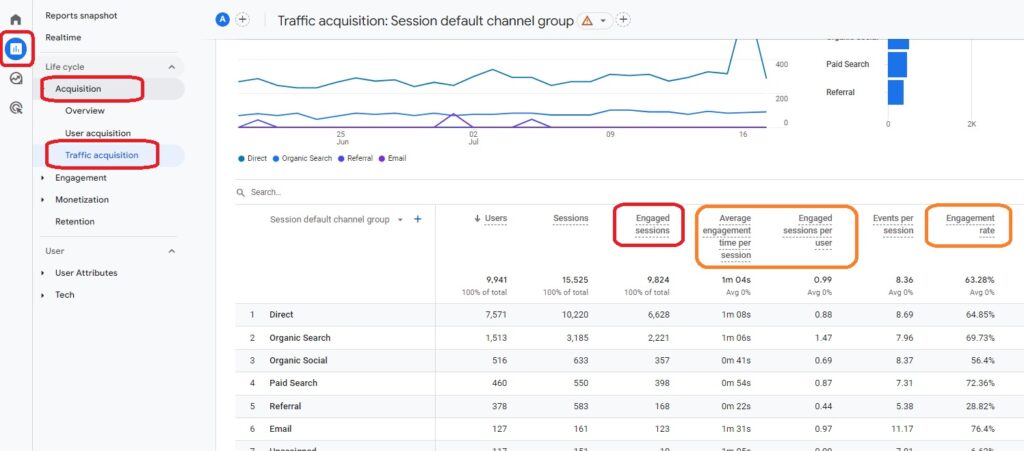
You can view the Engagement report in GA4 by going to Acquisition > User Acquisition and Acquisition > Traffic Acquisition reports. It’s worth noting that engagement rate is not available in every report.

When looking at the Engaged Sessions column you are looking for a high number of Engaged Sessions, in relation to the total number of sessions on your site. Sessions are visits to your site, where a user may have visited more than once. This way you know the content on your site and potential marketing activities are engaging and driving the right visitors to your website. If it was a low number then you are potentially driving people to your webiste who are not the correct target audience, or the content is not engaging enough.

What other engagement metrics does GA4 have?

As well as Engaged Session, GA4 has the following metrics available:

  • Engagement Rate – the higher the percentage, the more engaged the visitors are, over 60% would be a good starting point for this
  • Average Engagement Time – towards or over a minute would be good for this
  • Engaged Sessions Per User – towards 1 or over would be good for this.

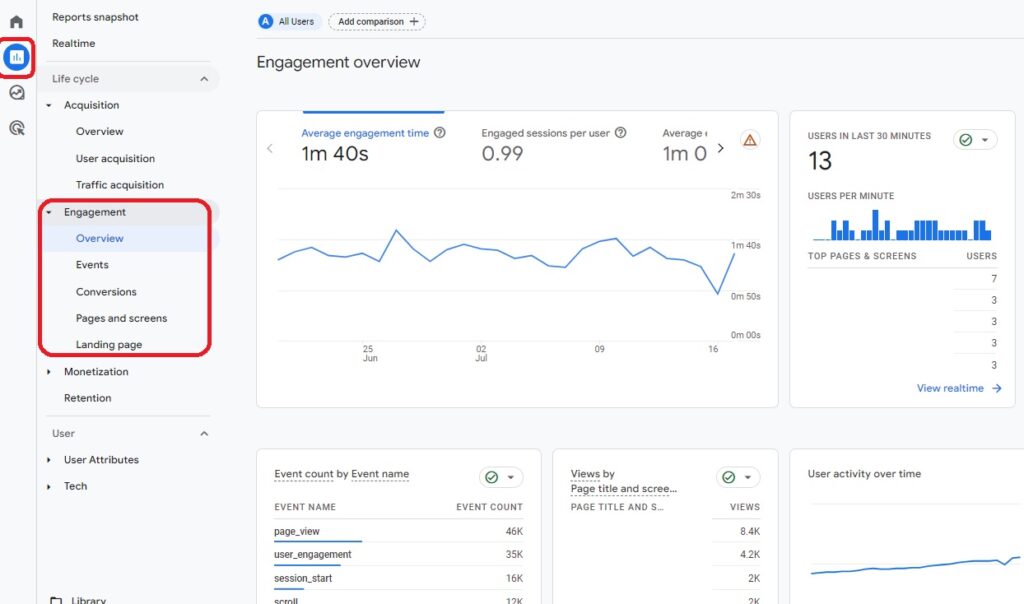
GA4 has an Engagement overview report, which summarises engagement data from the engagement reports (including Events report, Landing pages report, Conversions report and Pages and screens report). One of the great things about GA4 is it’s much more customisable than the old UA, and you can even customise the overview report to suit your company’s goals. You can view the overview report by clicking on Reports > Engagement > Engagement overview.  

Why is page engagement so important?

Engagement is so important when it comes to users visiting your website or app for two main reasons.

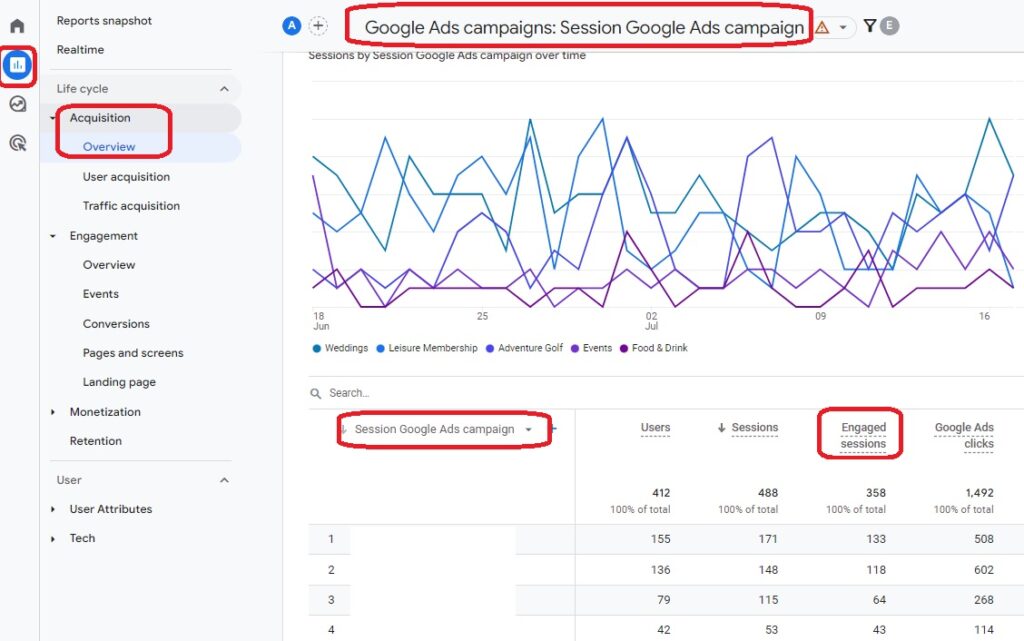
  • It lets you know what is working on your website or app, so that you can do more of it. This includes getting a break down by Google Ads campaigns for Engaged essions, if you are running Google Ads.
  • It is a huge factor in search engine optimisation (SEO) and contributes to pages moving up in search engine results. Every year since 2016, Google has increased the importance of engagement and it rewards pages where visitors have clearly found exactly what they were searching for, in other words your website or app has provided value.

With this in mind, we are so glad to see that engagement is big part of GA4 and we hope you find it as useful as we have.

If you want to know more about GA4 we have this blog, covering all you need to know as well as this helpful step by step video on GA4 reporting.

A detailed walk through of GA4 reporting

A detailed walk through of Google Analytics 4 (GA4) reporting

If you have switched over to Google Analytics 4 (GA4) and are unsure of the unfamiliar layout, then this blog can really help. We have created a helpful video (please see below) and the steps in the video are also transcribed here, where we will be walking you through the key areas of reporting in the new GA4.

A detailed walk through of GA4 reporting

When you open up GA4, the home page will give you an overview of your users and visitors. To break all this down into statistics click on ‘reports’ on the left hand side. The ‘realtime’ tab will show you your visitors in the past 30 minutes, what pages they have visited and if any conversions happened over that time period, as well as their location. 

Acquisition tab explained

If you want to view stats from a longer time period than 30 minutes, click on ‘acquisition’ and ‘traffic acquisition’, you will probably recognise this, as there was an equivalent page in the old Universal Analytics (UA). As with UA, set your date range in the top right corner. Here it groups the data by channels (traffic sources) such as organic search (search engine traffic – Google, Bing etc.), cross-network which is where they came through a paid ad for example and then also from an organic search visit or direct visit, and paid search and so on. You may find it useful to break the reporting down by traffic source, so to do this you click on ‘session source/medium’ on the drop down menu above those traffic sources. This will further break down the traffic sources, so for example rather than just paid search, you will see how many visits were from each adverting channel, such as Google Ads and Bing Ads. Here you get a break down by users, which is individual users, then sessions which is where someone visits the site more than once and engaged sessions, which is where someone is spending time on your site.

GA4 Events

As mentioned in a previous blog, GA4 collects event based data, meaning that it’s focused on tracking engagement on your site or app (rather than sessions and page views as UA did). There are pre-set events in GA4, such as add to cart or purchase. You can also create your own events, so for example if you have an enquiry form and you want to track when someone fills it out and submits it. You can also view conversions here, which could of course be a purchase, or it could be when someone submits an enquiry form – you could list that as a conversion. To the right hand side you will see your revenue generated when relating to purchases.

Campaign conversions

It can be very useful, particularly if you are running Goggle Ads to see what campaigns are converting. To do this, click on the + icon (top left, above the traffic sources), type in ‘campaign’ and click on ‘first user campaign’ which is a user’s first visit to your site, as sometimes people go through Google Ads and convert on the second/third visit to your site, which might be a Google Organic and/or Direct visit.

User acquisition may be further helpful to view as it tracks someone’s first visit to your site, so if you then click on ‘first user source/medium’ to the left above the traffic sources, and then look at the total revenue to the right, you may see that your Google Ads have picked up a few more conversions and higher revenue than reported in Traffic Acquisitions (which reports by last visit to the site). We are seeing this for some ecommerce clients but not all, depends on your customer base and how many visits it generally takes for them to then convert on your site.

If you then want to further review your Google Ads campaigns go to the Overview section. Below the first line of graphs and tables, if you scroll down, you can see a breakdown of your campaigns. Click on ‘view Google Ads campaigns’ and this will show you how many visits you are getting though your campaigns, your conversions, revenue, the Ad spend and return on Ad spend. It’s worth noting that you may need to track it over 28/30 days, as it needs a minimum of 50 sessions per campaign to be able to track those stats back to a campaign.

Reporting for ecommerce

If you have an ecommerce website, under the Monetization tab and ‘ecommerce purchases’ you will get a breakdown of the items you’re selling on your site or app, what products have been viewed, added to cart and are converting, have been purchased and then the revenue. You can track this back to individual campaigns too, if you click on the + symbol and type in ‘campaign’, it will tell you what campaign is converting for that product. If you have an enquiry page, you’ll be able to get that data under the Engagement tab and ‘Events’ drop down.

Please note that Google Analytics is not 100% accurate and is not able to track all visits and all transactions/events that happen on the site, so for example when people block cookies, block tracking on iPhones, or change devices and so on. It still gives a great indication of how well your site is performing though, the traffic sources that are leading to visits and how they are potentially converting for transactions and enquiries.

We hope you found this video and transcript useful for getting to know GA4 reporting better. If you need any help managing your Google Ads and reporting please get in touch with us at Q Social Media.

cookieless marketing

How to navigate cookieless marketing

We mentioned briefly in our last blog (Google Analytics 4 (GA4) – everything you need to know) that the use of third party cookies is going away. Here, we want to explain exactly what that means for your business and what you can do instead.

What are third party cookies?

Third party cookies are pieces of code that allow websites to track users across the web and collect information, in order to provide them with a better user experience. They are also used by platforms such as Facebook, Instagram and Google to target audiences with relevant ads and to re-market products to them that they’ve already viewed.  

Why are third party cookies going away?

While cookies have been great for marketers in terms of targeting, companies like Google are now no longer supporting tracking from third party cookies on their ad networks, as audiences are requesting more privacy. The Firefox and Safari web browsers have actually blocked third party cookies since 2013, but if you’re wondering why it’s really coming to an end now, it’s because Google Chrome (used by over 65% of people as a web browser) is no longer supporting this type of data tracking.     

Online advertising and digital marketing without third party cookies

These tips will help you to navigate cookieless marketing

Without third party cookies, online advertising certainly becomes less personalised to new audiences, but the good news is there are things you can do to continue to target the right people for your business.   

  1. Produce quality digital marketing content – Firstly and very importantly, businesses must produce quality digital content that offers true value to their audience (we talk about this is our art of SEO copywriting blog). If you are able to put yourself in your audiences’ shoes, understand their pain points and share content that they love, then you will be offering ‘personalised content’ that your audience will want to come back to, without the invasion of their privacy
  2. Collect first party data – If you haven’t already, start collecting first party data. This is data that comes from your own sign up forms, newsletters, surveys and email sign ups etc. and is owned by your business. It can be used again and again without the need to rely on data being collected by other platforms
  3. Leverage Google Analytics 4 (GA4) – GA4, the new version of Google Analytics is a powerful way to collect data about your audiences. The new version provides much more data than the older Universal Analytics and allows businesses to gain detailed insights into user behaviour on both their website and app in one place. You can read more about it here in our blog
  4. Add GA4 audiences to your online advertising campaigns – create audiences in GA4 such as those who visited certain pages of your website, but did not make a purchase and re-target them with your products or services
  5. Try interest based online advertising – How is Google Ads getting around not being able use third party cookies to target users? They created the Google Privacy Sandbox which allows websites to access user information without invading their privacy, as the information stays anonymous. It enables businesses to target people through Google Ads based on their interests. You can target people by interests on Facebook too, meaning that if you own a surf shop and you target men and women between 25 and 35 and choose surfing as an interest, they are highly likely to be interested in your brand
  6. Know your demographics – You can still target people by demographics on Facebook Ads for example, as Facebook asks their users for this information, therefore it’s first party data that is owned by Facebook
  7. Target by location – you may know that you can target people by location on Facebook, but did you know that you can go deeper than that? You can target people who are travelling in a location (great if you own a shop and you know most of your business comes from tourists). You can also choose options including people who live in that location or people who were recently in that location. 

As you can see, luckily we don’t need to know every step that a user takes on the web to be able to target them. We hope you found this blog useful and if you would like help with your online advertising then please get in touch with us at Q Social Media.