Your Trusted Digital Marketing Agency

Author: Chris Wood

How to lower your Google Ads CPC without sacrificing performance

How to lower your Google Ads CPC without sacrificing performance

In today’s competitive landscape, most growing businesses are leveraging PPC (Pay Per Click) advertising. A key objective in these campaigns is to reduce the cost per click (CPC) while maintaining performance. Lower CPC can lead to a more cost effective campaign, gaining more Ad clicks for your budget and boosting your return on investment. However, achieving a low CPC takes a strategic approach. Here are 6 actionable strategies to help you lower your CPC while keeping performance high.

1. Utilise long-tail keywords and experiment with new variations

To reduce the CPC, start by refining the keywords you bid on, particularly with ‘long-tail keywords’.  These are phrases containing four or more words, which are often less competitive and therefore less costly. While long-tail keywords may bring fewer visitors to your website, they typically attract more qualified leads, as users searching with specific phrases are further along in their decision making process.

Finding Long-Tail Keywords:

  • Google Ads Keyword Planner – Estimate search volume and CPC for potential keywords
  • Search terms report – Analyse suggestions based on actual user search queries
  • Google Autocomplete – Enter keywords into Google’s search bar and use suggested variations to uncover new, specific options

By continuously exploring and testing new keyword variations, you may discover low cost, effective terms that your competitors are overlooking.

2. Experiment with different match types

Adjusting your match types can impact CPC, as each type controls how closely your Ads match a user’s search query. Testing different match types can help you find the balance between cost and quality traffic for your campaigns. Here are the match types that we would recommend testing:

  • Phrase Match – Bids on phrases like ‘king size memory foam bed’ can bring in searches with slight variations, such as ‘king size memory foam bed under £1,000’
  • Exact Match – Targets only the exact keyword you bid on, which can help control relevancy and CPC

3. Implement negative keywords

For Search Ads campaigns adding negative keywords helps avoid clicks from irrelevant searches. For instance, if your brand sells high end art, you might want to exclude searches like ‘cheap paintings’ by adding ‘cheap’ as a negative keyword. Creating a negative keyword list and applying it at the account level can streamline this process.

If running Google Shopping campaigns, including Performance Max, negative keywords are especially valuable to potentially increase online sales, as they help refine targeting and prevent wasted Ad spend on unqualified clicks. By blocking search queries not of relevance this improves CTR, which can over time lower click costs and allow more Ad clicks for your budget.

4. Adjust your bidding strategy

Google Ads offers various bidding strategies that can impact your CPC, including automated options like:

  • Maximise Clicks
  • Maximise Conversions
  • Target CPA (Cost per Acquisition)

Automated bidding strategies use algorithms to optimise for your desired outcome, whether it’s clicks or conversions, while keeping CPC in check. If you prefer more control, manual bidding allows you to set specific bid amounts.

If you are a retailer and you’re gaining towards 30 conversions or more on Ads over 30 days, ensure you are running Maximise Conversions or Target CPA as this will help gain more conversions or lower costs for conversions. Otherwise, we would recommend sticking to maximise clicks and set a max bid, if you are not gaining enough conversions or tracking conversions are not applicable, then this is often the best strategy to get the most clicks for the Ad budget available.

5. Lower keyword bids strategically

Lowering your keyword bids can help you find a balance between CPC and Ad position. You don’t always need to appear at the top (which costs the most) – the second, third, or fourth position can still be effective while keeping costs down. It’s likely the Ad budget will still be spent and gain more Ad views/clicks for it. You can start by reducing bids in small increments (10 to 20p) to avoid drastic drops in Ad visibility. If you’re running a ‘Maximise clicks’ or manual bid strategy, adjusting bids this way may help you get more impressions and clicks within your budget.

6. Regularly Review and Adjust

Lastly, continuously monitor and optimise your campaigns. Review CPC, CTR, conversion rates and other performance metrics regularly to identify what’s working and where you can cut costs. By staying agile and making data driven adjustments, you can maintain high performance and keep your Google Ads budget in check.

If you need any expert help with your Google Ads campaigns please get in touch with us at Q Social Media.

4 Reasons Remarketing is Essential for Successful Marketeers

4 Reasons Remarketing is Essential for Successful Marketeers

Remarketing is a powerful tool and a great way to complement all of your marketing activities (online and offline). In this blog post we talk you through the main reasons remarketing should be an essential tool in your digital marketing strategy in order to help maximize ROI.

What is remarketing?

Remarketing, or retargeting, helps you to reach a huge percentage of those people who came to your site and left without converting. There’s a number of reasons why people might have left your site. Whilst it could be that they just aren’t interested or bought elsewhere, it may also be that they were busy or distracted, or perhaps just needed some time to think about their purchase.

That’s where remarketing comes in.

Think of your remarketing efforts as a helpful reminder to your site visitors that your product is there waiting for them if they need it; gentle encouragement to finish their purchase, while reinforcing your branding and messaging to that user every time they see your remarketing ads.

1) Save Money with Remarketing

Compared to many other forms of digital marketing, remarketing is very cheap. For small businesses who are bidding on highly competitive keywords for their search ads, remarketing ads are a life saver! They have much lower click costs compared to search ads. If your ads are compelling and engaging, potential customers might just head back to your site and buy from you!

2) Enjoy Higher Conversion Rates

The people you are reaching with your remarketing ads are ‘hot leads’, people who have done their product research and are ready to buy.

Whilst your search ads get people to your site who have expressed an interest in the sorts of products or services you offer, remarketing allows an extra level of sophistication. It allows you to target people, perhaps those not yet purchased or looked at a certain page, therefore elevating your conversion rates.

3) Increase Brand Recognition

An important factor to remember about remarketing is that you only pay when someone clicks on your ads. This means that thousands of people (potential customers!) could view your remarketing ads every month for free!

This is a huge perk of remarketing and one which shouldn’t be undervalued. Even if people don’t choose to click on your ad, your brand name and message is being seen. This can lead to an increase in organic searches from people who have now heard of your brand name – great news for smaller, less established brands.

4) Maximise your ROI

After spending all that money getting people to your website, it just doesn’t make sense to let them disappear.

Remarketing builds on your existing efforts at converting web visitors to leads or sales. It maximizes the value of your current marketing spend and fine tunes it to boost your current ROI.

Remarketing makes sense for any brand which wants to save money, enjoy higher conversion rates, increase brand recognition and maximize ROI! If you need help with any of your remarketing campaigns we’d love to be of assistance. Q Social Media specialises in b2c and ecommerce businesses – based in Exeter, working with clients throughout the UK.

Get Ahead by Targeting your Competitor’s Website Visitors

Wouldn’t it be great if you could target those visit competitor sites with a targeted ad campaign? You can!

If you’re a small business with a small budget it can be hard to compete with the marketing budget and dominance of the big companies. One area you can be smart with your budget is using Google Display Ads to target the website visitors of your competitors, as well as people’s previous search history. Didn’t know you could do this? Read on!

How does it work?

People don’t always purchase online straight away, especially for higher value products, so targeting visitors to competitor sites allows your business to be considered whilst someone is making a decision.

You can set this up creating a Google display campaign in your Google Ads dashboard. Select a custom audience and input the website addresses and keywords you want to target. From this Google will build an audience to show your Ads to.

Use Google Responsive Display Ads – upload a couple of images, enter ad text and landing page and Google will create the ads for you (read more here). These ads will appear on a variety of websites as your target audience browse the internet.

A fictional example might be as follows. Your website is called www.wetweathergear.co.uk and your biggest competitors are ‘Stay Dry’ and ‘Outdoor Gear’. You create a display campaign and under custom audiences you insert the competitor website addresses www.staydry.co.uk and www.outdoorgear.co.uk along with search terms such as ‘womens raincoats’ and ‘mens raincoats’. If you want to be more specific you can insert the sub pages of the competitor sites e.g www.staydry.co.uk/raincoats.

Does your Product/Service have a high Cost Per Click?

Display Ads are particularly advantageous when your product has a high cost per click for Google search ads. This means you can let your competitor pay a high amount to get people to their own site and then remarket to them with your ads at usually a much lower cost per click!

As you can see, there are a lot of benefits to setting up Google Display Ads targeted to competitor sites visitors and key search terms. To find out more about using Google Display Ads to target your own site visitors read our previous blog on remarketing here For help with setting up your Display Ads or ongoing ads management contact us.

Online Retailers – How to Sell Your Products on Instagram

Are you active on Instagram and keen to start selling your products through this channel?

The Instagram Shopping feature allows users to find out more about featured products shared by retailers they follow. Nearly half of people surveyed by instagram use the platform to shop weekly, so it’s a great channel for ecommerce businesses to explore. Read on to find out more about this feature.

What you need to know

In order to set up Instagram shopping you need to be an online retailer and your account needs to reflect this by being set up as a business account and by sharing posts which relate to your retail business.

Instagram is owned by Facebook, so to be able to set up Instagram shopping, you must be set up in Facebook Business Manager. You also need to set up a Product Catalogue and link your Instagram account. It is also worth making sure you are using the shopping and retail category on your Facebook page. Facebook will now check your Instagram account and once it’s approved you can enable the shop function through the settings/shopping function in your Instagram app.

Instagram shopping only works for retailers who sell physical goods. There are also various other exclusions which you can read more about here.

How it Works

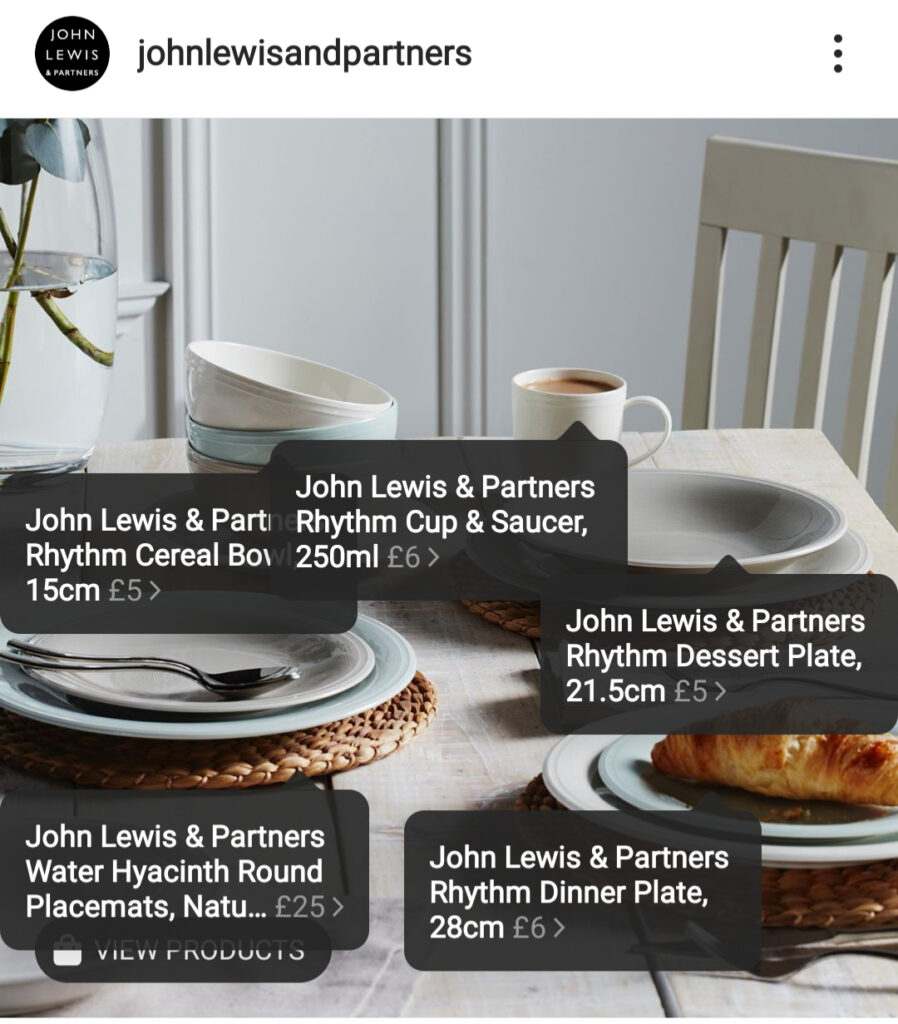
Once your account is approved, you can now tag products in your posts. Product tags let you highlight items from your catalogue directly in your images and videos, so people can easily tap and learn more. Shoppers can easily find out your product prices and details and to follow a link on where they can buy them.

You can tag up to 5 products per single-image post and video post, or 20 products per multi-image post. Not only can you tag products in new posts, the good news is you can also go back through your feed and tag in historic posts with product information.

When viewers see one of your tagged posts in their feed it will have a little shopping icon on the bottom left, as in this post from John Lewis:

When they click on this icon they will then see expanded information about the products. If they click on one of the products they will then be directed to the relevant website page were they can buy it.

Once you have created at least 9 shopping posts your Shop tab will be activated. The shop tab appears at the top of your profile and allows your audience to browse through previously tagged products.

The Instagram Shop feature makes it much easier for customers to discover new products, and buy them as well.

We hope you are successful in setting up Instagram shopping and making it work for your business. If you need any help, get in touch.

How to optimise your Google Responsive Search Ads

How to optimise your Google Responsive Search Ads – top 5 tips

Do you need help with your Responsive Search Ads? In this blog we are going to cover how to optimise them so you can get the most out of your Ads.

Before we start, what are Google Responsive Search Ads?

You write your headlines and descriptions for your Ad and Google will move them around to get the best results based on each search over time. You can enter up to 15 headlines and 4 descriptions. If you are missing the old static Search Ad format, you can pin your headlines into certain positions, so that for example if you only want a headline to show in position 1. This is one way to optimise your Ads, if you have a message that you always want people to read first. If you want to know even more about Google Responsive Search Ads before you read on, then please read this blog first where we explain all.

  1. As we said above, one way to optimise your Ads is to pin your headlines. We recommend letting Google have a go first, then you can see which headlines are performing the best. Or if you have a message that you really want people to see in position 1, 2 or 3 you can pin it, so that it always shows in that position. Here’s what Google says about pinning: “Pinning reduces the overall number of headlines or descriptions that can be shown. Therefore, the less you pin, the more combinations you can create. If you must use pinning, consider having multiple unique assets pinned to the same position”. So they are saying that if you do want to pin a headline to position 1, consider having a couple more completely different headlines pinned to the same spot so that Google still has the flexibility to move headlines around.
  2. If you want to let Google have complete control, so that it can use its machine learning to show the best possible combination each time then you can leave your Ad completely ‘unpinned’. Because Google moves the headlines around, this kind of Ad needs to be more thought out that the old static format. This means that every headline and description combination needs to make sense if it was on its own and with every other combination that Google may show.
  3. We recommend using all the headlines and descriptions that are available, especially if you are leaving your headlines unpinned so that Google has lots of combinations to test. If you write the full 15 headlines and 4 descriptions then Google will test and optimise 43,680 different versions of your Ad, so it’s well worth putting in the effort. It’s important not to repeat any of your headlines, as if two were to show together you would be saying the same thing twice.
  4. Use Google’s Ad strength tool to optimise your Ads. Google has this tool on each Responsive Search Ad, providing you with feedback to help improve your Ads. It will let you know if you need to add:
    • more headlines for better performance (Google will give you headline suggestions based on your keywords and landing page)
    • Include more of your chosen keywords in your Ad copy
    • Make your headlines or descriptions more unique.
  5. Finally make sure your landing page matches what people are searching for and if you can include some of the keywords you’ve chosen for your Ads on your landing page too, so that from the search, to clicking on your Ad and then landing on your website people are getting exactly what they are looking for. Also make sure on your landing page that there is a clear call to action, whether that is filling out a contact form, or a visible phone number or email address.

Just as one last tip, this may seem obvious but please make sure your grammar is correct and there are no spelling mistakes and do take the time to create well-written Ad copy to help your Ads stand out.

We hope you found this blog helpful and if you need any help setting up or managing your Google Search Ad campaigns please get in touch with us at Q Social Media.
Retailers - increase online sales with Facebook Ads

Retailers – How to increase sales with Facebook Ad Campaigns

Facebook Ads can be a powerful tool for retailers wanting to reach new and existing buyers. By targeting your Ads to specific audiences, you can increase your chances of success. Two very effective ways to target your ideal audience are to use lookalike audiences and to retarget website visitors. Now is the perfect time to get started with Facebook Ads to help boost your sales just in time for Christmas, so let’s get started.

Lookalike audiences

Lookalike audiences are audiences that Facebook creates based on a source audience that you provide. Facebook analyses the source audience and identifies other people who are similar in terms of demographics, interests, and behaviours. This can be a great way to reach new people who are likely to be interested in your products.

To create a lookalike audience, you can use a variety of source audiences, such as:

  • Website visitors
  • Your Facebook page & Instagram followers and engagements
  • Your email list

These audiences can be created in Audience Manager here: https://adsmanager.facebook.com/adsmanager/audiences

Retargeting website visitors

Retargeting allows you to show Ads to people who have already visited your website. This is a great way to remind people of your products and tempt them to come back and buy from you.

To retarget website visitors, you need to install a Facebook pixel on your website. This is a small piece of code that tracks which pages people visit on your website. Once you have the pixel installed, you can create custom audiences of people who have visited your website via the above Audience Manager.

Create your Facebook Ads

Now it’s time to actually create your Ads. To create a new Ad campaign, click on the ‘Create’ button in the top left corner of your Ads Manager. Then, select the type of ad campaign you want to create. There are a variety of different ad campaign types available, including:

  • Store Traffic – This type of ad campaign is designed to drive traffic to your website or physical store
  • Lead Generation – This type of ad campaign is designed to generate leads from potential customers
  • Product Catalog –  This type of ad campaign is designed to promote your products to potential customers
  • Brand Awareness – This type of ad campaign is designed to increase brand awareness for your business

Your Ad creative

Your Ad creative is the text, images, and videos that will be used in your Ads. It is important to create Ad creative that is eye-catching and relevant to your target audience. You can use Facebook’s Ad preview tool to see how your Ads will look before you launch them.

Here are some additional tips for setting up Facebook ad campaigns for retailers:

  • Use high-quality images and videos in your Ads
  • Write clear and compelling Ad copy
  • Use a strong call to action, such as ‘shop now’
  • Set a budget and schedule for your campaigns. This will help you track your spending and ensure that your Ads finish running for seasonal campaigns
  • Track your results and make adjustments as needed

Monitoring your campaign’s performance

Once your campaign is up and running, it’s important to regularly monitor its performance and make adjustments as needed. You can track your campaign’s metrics in Ads Manager, such as impressions, clicks and conversions.

We hope you found this blog useful. By running Lookalike audience Ads and retargeting your website visitors you can help to reach your target audience and increase sales over the festive period. If you need expert help with the technical setup of Audiences, Pixels and Ad campaigns we can help, along with reporting in how they are performing. Please get in touch with us at Q Social media.

2025 digital marketing trends for UK retailers

8 key 2025 digital marketing trends for UK retailers

The digital marketing landscape is set to undergo significant transformations in 2025, presenting both opportunities and challenges for UK retailers. To maintain a competitive edge, it’s crucial to stay informed about emerging trends and adapt strategies accordingly. Here are 8 key digital marketing trends that we recommend you focus on this year.

1. AI driven personalisation

Artificial Intelligence (AI) is revolutionising personalised marketing by enabling brands to analyse vast amounts of data in real time. This allows for the delivery of hyper-targeted messages tailored to individual preferences and behaviours, enhancing customer engagement and conversion rates.

Here are a few simple ways to implement AI in to your digital marketing:

  1. Brainstorming – You may feel stuck from time to time when brainstorming blog content ideas or ideas for a social media campaign. A really simple way to help with this is to go to an application like Gemini and type in what you want generate ideas for and Gemini will then quickly generate a list of ideas for you
  2. Written content creation – This is a very easy way to generate ideas for blogs, it can help you with ideas you might not have thought of, how to structure your blog and even re-fresh old blogs. Simply copy and paste old blogs into AI applications and it will give you new versions of your old content to take ideas from
  3. Video content creation – There are many tools that can help with video creation including text-to-speech generation, realistic AI voices, animations and more
  4. Email marketing personalisation – We recommend using easy to use email marketing platforms such as MailChimp, which are powered by AI to send personalised email campaigns to your subscribers
  5. Automated social media marketing – AI-powered tools can automate social media marketing tasks such as creating, designing and scheduling posts. You can even use it to analyse the audience engagement and measure performance using different metrics. Some platforms include Hootsuite, Flick and FeedHive. If you would like more in depth information on how to use AI for your business, please check out our blog – 5 easy ways to start using AI in your digital marketing.

2. Voice and visual search optimisation

With the increasing use of voice activated devices and visual search tools, optimising content for these search methods is becoming essential. This involves creating voice friendly content with a conversational tone and optimising images for visual search engines to improve discoverability.

3. Augmented Reality (AR) experiences

AR is becoming integral to the shopping experience, allowing consumers to virtually try on products or see how items would look in their environment. Implementing AR on your website can enhance the online shopping experience, boost engagement and reduce return rates by setting realistic expectations before products are purchased.

4. Sustainability and ethical marketing

We think this trend is really important – UK consumers are increasingly prioritising brands that demonstrate a commitment to environmental sustainability and social responsibility. Brands that actively promote eco-friendly practices and ethical sourcing are likely to earn trust and loyalty from socially conscious buyers.

5. Short form video content

The popularity of platforms like TikTok and Instagram Reels has led to a rise in short form video content. Creating engaging, concise videos will help capture the attention of modern consumers with shorter attention spans, due to the sheer amount of content they consume each day.

6. Omnichannel marketing with a seamless experience

Consumers expect seamless interactions across all touch points, whether shopping in-store, browsing a website, or scrolling through social media. Providing a unified customer experience across channels is becoming increasingly important, as consistency will add to the trustworthiness and authenticity of your brand.

7. Live Streaming and social commerce

Live streaming is revolutionising ecommerce by merging online shopping with interactive, real time entertainment. Platforms like TikTok Shop are particularly influential, driving impulse purchases through viral content.

8. Data privacy and ethical marketing

With increasing concerns over privacy and the phasing out of third party cookies, brands will need to rely more heavily on zero party and first party data. Focusing on collecting their own data through their website analytics, online advertising and email marketing reporting for example. Leveraging this data can help create more personalised and relevant marketing strategies without relying on third party sources.

By focusing on these key trends, UK retailers can adapt to the evolving digital landscape, meet consumer expectations and maintain a competitive edge in 2025. If you need any expert help with your digital marketing on Google and Facebook Ad campaigns in 2025 please get in touch with us at Q Social Media.

digital marketing tips for wedding venues

Increase your wedding venue’s visibility with these 6 digital marketing tips

In today’s competitive wedding industry, a robust online presence is no longer a luxury, it’s a must. With countless options available to couples planning their special day, how can you ensure your wedding venue stands out online? Here we are diving into to our essential digital marketing tips to help attract more couples to your website, and more wedding bookings.

  1. Dominate local search results

    Potential couples often begin their search for venues by looking for options near their desired location. Optimise your Google My Business listing with accurate details, beautiful imagery and positive reviews to ensure your venue appears prominently in local search results. Encourage satisfied couples to share their experiences and respond promptly to all reviews, positive and negative to foster trust and credibility. Also, ensure your location is clearly visible and easy to find on your website and mentioned seamlessly throughout the copy. If you want more tips specifically on local SEO, please take a look at this blog.

  2. Create compelling visual stories

    Short-form video content has really taken off and grabs peoples’ attention in their busy lives. Platforms like Instagram Reels and TikTok offer a fantastic opportunity to showcase your wedding venue’s unique charm. Create captivating videos that highlight your venue’s rooms, amenities, surroundings, and overall wedding experience and show your venue dressed for different weddings, helping couples picture how their own could look. These visually appealing videos can help capture the attention of potential couples and leave a lasting impression.

  3. Maximise visibility with Google Ads

    Google search Ads are fantastic for gaining page one presence, especially if your website is not already there organically for your local area. Display Ads are a great way to build awareness of your venue with relevant audiences, and remarketing Ads can be very powerful in capturing the attention of couples who have previously visited your website. Overall we really recommend Google Ads as a digital marketing tool for wedding venues looking to stand out and increase bookings.

  4. Convert online browsers into bookings with visual Ads

    Platforms like Facebook and Instagram offer a variety of advertising options that can help convert casual browsers into viewings and bookings. Utilise high quality images and videos to showcase your wedding venue’s best features and experiment with different Ad formats to find what works best for your audience. Don’t forget the power of retargeting to re-engage potential couples who have previously shown an interest in your wedding venue. For this, we recommend Facebook image and video Ads to targeted audiences, lookalike audiences (audiences similar to those who have already booked their wedding with you) and retargeting audiences that have visited your website before, but then left.

  5. Optimise your website for mobile

    With the increasing use of smartphones, it’s crucial to have a mobile-friendly website. Ensure your website loads quickly, is easy to navigate and provides essential information such as wedding availability, pricing and contact details. A well optimised mobile website will enhance the user experience and make it easier for couples to book viewings of your wedding venue and make enquiries.

  6. Leverage the power of blog writing

    Create informative and engaging blogs to attract the right visitors to your website. Well-written blogs can improve your search engine rankings and provide valuable information to potential couples. Use relevant keywords throughout your blog posts to help your content appear in search results. There are so many blog subjects for wedding venues, think about what your audience really wants to read about, showcase your venue’s unique features and have fun with it!

By implementing our 6 top digital marketing tips for wedding venues, you can significantly enhance your venue’s online presence and attract more wedding bookings. If you need assistance with any aspect of your wedding venue’s digital marketing, please get in touch with us at Q Social Media.

Simple digital marketing tips for holiday accommodation sector

Simple and effective digital marketing tips for the holiday accommodation sector

In today’s competitive holiday accommodation market, a strong online presence is no longer a luxury, it’s a necessity. With countless options available to potential guests, how can you ensure that your accommodation business stands out? Let’s dive into our essential digital marketing tips to help you attract more bookings.

1. Dominate local search

Potential guests often search for accommodations near specific locations. Optimise your Google My Business listing with accurate details, stunning imagery and positive reviews. Encourage satisfied guests to share their experiences and make sure you respond promptly to all reviews, both positive and negative. Also, ensure your location is clearly visible and easy to find on your website. If you want more tips specifically on local SEO, please take a look at our blog – tips for businesses looking to improve their local search ranking.

2. Create irresistible visual stories

Short-form video content is taking the world by storm. Platforms like TikTok and Instagram Reels offer fantastic opportunities to showcase your property’s unique charm. Create captivating videos that highlight your accommodation’s amenities, surroundings and overall guest experience.

3. Leverage Google Ads for maximum visibility

Google search Ads are a great way to secure a prominent page one presence. By crafting compelling Ad copy and using location targeting, businesses can increase their visibility to potential guests actively searching for accommodation in their area. Google Display Ads can be used to build awareness to targeted audiences and Remarking Ads are great for retargeting website visitors to remind them to book with you, when they may be looking at other sites or distracted with looking at something else.

4. Turn browsers into bookers with visual Ads

Platforms like Facebook and Instagram offer powerful advertising options that can help convert casual browsers into paying guests. Utilise high quality images and videos to showcase your property’s best features. Experiment with different Ad formats to find what works best for your audience. Don’t forget the power of retargeting – re-engage potential guests who have shown interest in your holiday accommodation. We particularly recommend Facebook image and video Ads to targeted audiences, lookalike audiences (audiences similar to those who have already booked with you) and retargeting audiences that have visited your site but then left.

5. Optimise your website for mobile

With the increasing use of smartphones, it’s crucial to have a mobile friendly website. Ensure your website loads quickly, is easy to navigate and provides essential information such as booking availability and contact details.

6. Personalise the guest experience

Today’s travellers crave personalised experiences. You could utilise email marketing for example to segment your audience and send targeted offers based on guest preferences and booking history. You could also offer exclusive deals and packages to reward repeat guests.

We also have a bonus tip and that is to write blogs. Blogs that are well written and contain useful information are a great way to attract the right visitors to your site. Blogs are fantastic for SEO, especially if you really want to improve on certain keywords, you can use those keywords to generate ideas for blogs and incorporate the keywords seamlessly throughout the blog’s wording.

By implementing these simple tips, you can significantly enhance your digital marketing efforts and attract more bookings. If you need help with any aspect of your digital marketing please get in touch with us at Q Social Media.
Digital marketing tips for UK retailers

7 simple digital marketing tips for UK retailers

A strong digital presence for retailers is more crucial than ever. But with so much to consider, where do you even begin? We have gathered our top 7 easy digital marketing tips to stay ahead of your competitors and bring more customers to your door (or online shop).

1. Optimise for local search

UK consumers are increasingly searching for shops near them. So if you have a brick and mortar store ensure your Google My Business listing is up to date with accurate information, inviting photos and customer reviews. Encourage happy customers to leave feedback and respond to both positive and negative reviews to showcase your commitment to customer service. Also make sure your location is easy to find on your website.

2. Embrace the power of short form video

They say a picture is worth a thousand words, but now, a short video is worth a million. Platforms like TikTok and Instagram Reels are booming and they’re perfect for showcasing your products in action. Create engaging, short videos that highlight unique features, user benefits, or even behind the scenes glimpses. Remember that it doesn’t have to be film quality – authenticity often resonates with people more, which is great news for busy store owners.

3. Leverage Google Shopping Performance Max (PMAX) campaigns

We highly recommend that retailers take advantage of Google Shopping PMAX campaigns. Here’s our top tips to getting the most out of them:

Focus on your product feed by including rich descriptions, high quality images and keeping pricing and availability up to date. Consider local inventory Ads to showcase in store options. Finally, use clear categories and provide as much detail as possible to ensure Google can effectively display your products to potential customers

4. Use Facebook Catalog Ads to convert browers into buyers

For online retailers, Facebook Catalog Ads can be a game changer. Here’s our tips on how to get the most out of them: 

Facebook offers detailed demographics, interests, and behavioural targeting options. Tailor your catalog Ads to reach people most likely to be interested in what you sell. Showcase high quality product photos and videos, as visuals are essential for grabbing attention and driving clicks. You can test different Ad formats. Try experimenting with carousels, single images and video to see what resonates best with your audience. And last but not least don’t forget the power of retargeting. Remind your website visitors about products that they browsed but didn’t buy. This ‘recently viewed’ nudge can be particularly effective in rekindling interest and converting lookers into buyers.

5. Let your customers speak for you

User generated content (UGC) is gold. Encourage satisfied customers to share photos and videos of themselves enjoying your products on social media. You could even run competitions to offer incentives for UGC and be sure to tag them and express your appreciation. Not only does this build trust and social proof, but it also creates a sense of community around your brand.

6.  A mobile friendly website is a must

The UK has one of the highest mobile phone usage rates in the world. So, if your website isn’t mobile friendly, you’re missing out on a massive chunk of potential customers. Ensure your website loads quickly, displays well on all devices, and offers a seamless shopping experience just like if they were using a desktop to shop your site.

7. Personalisation is key

Gone are the days of generic marketing. Today’s consumers crave personalisation. You can use email marketing platforms that allow you to segment your audience and send targeted campaigns. Also you could highlight products relevant to past purchases or browsing history and offer exclusive discounts or promotions to loyal customers.

By implementing these 7 simple yet powerful tips, you can elevate your digital marketing and attract more customers to your physical or online store. Remember, consistency is key. So keep creating engaging content to attract your ideal audience.

If you need any help with your digital marketing on your Google and Facebook Ads, please get in touch with us at Q Social Media.